
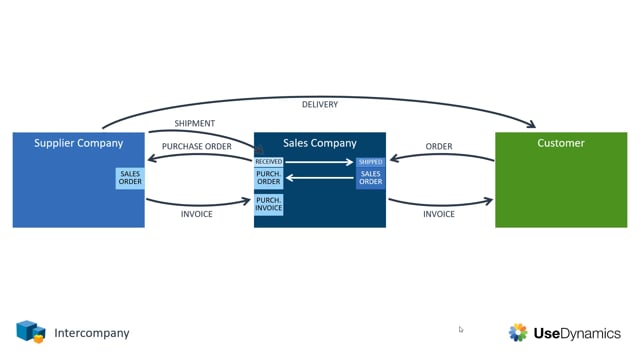


The intercompany app in Microsoft Dynamics 365 Business Central automates the transactions that flow between two companies in the same group. When a sales company sells items that are delivered by a separate supply company, the app creates the matching purchase orders, sales orders, shipments, and invoices automatically across both companies.
You start the process by entering a single sales order in the sales company. When you release that order, the app generates a purchase order in the sales company and a corresponding sales order in the supply company without manual re-entry.
When the supply company ships the items to your customer and posts the shipment, the shipment information is sent back automatically so the sales company can receive the purchase order and ship its own sales order to the customer.
The invoicing follows the same flow. The supply company posts its invoice to the sales company, which creates a purchase invoice there. You then post the sales invoice to your customer and post the received purchase invoice from the supply company.
How the intercompany app handles transactions automatically
When you use the intercompany app, a large part of the transactions between your companies are handled for you. To understand what the app does, it helps to walk through a typical setup with three parties involved: a supply company, a sales company, and the end customer.
Creating and releasing the sales order in the sales company
The process begins when your customer places an order. The customer calls in and you register a sales order in the sales company.
When you release that sales order, two things happen automatically:
- A purchase order is created in the sales company.
- A sales order is created in the supply company.
You only enter the order once. The app takes care of generating the related documents in both companies.
Shipping the items from the supply company to the customer
When the supply company actually delivers the items to your customer, they post the shipment. That shipment is sent back to the sales company automatically.
In the sales company, this allows you to receive the purchase order and ship the sales order to your customer. The physical delivery and the document flow stay aligned across both companies.
Posting the invoices across both companies
The invoicing follows the same automated pattern. The supply company posts the invoice from their sales order to the sales company, where a purchase invoice is created automatically.
In the sales company, you then complete two steps:
- Post the sales invoice to your customer.
- Post the purchase invoice you received from the supply company.
Once both invoices are posted, the transaction is complete in both companies.
Q&A
What does the intercompany app in Business Central do?
It automates the transactions that flow between two companies in the same group, such as a sales company and a supply company. When you create a sales order in one company, the app generates the matching purchase orders, sales orders, shipments, and invoices in both companies automatically.
What happens when I release a sales order in the sales company?
Releasing the sales order automatically creates a purchase order in the sales company and a corresponding sales order in the supply company. You do not have to enter these documents manually.
How is the shipment handled between the supply company and the sales company?
When the supply company posts the shipment of the items to your customer, the shipment is sent back to the sales company automatically. The sales company can then receive the purchase order and ship its own sales order to the customer.
How are invoices posted between the two companies?
The supply company posts its invoice to the sales company, which automatically creates a purchase invoice there. In the sales company, you post the sales invoice to your customer and post the received purchase invoice from the supply company to finish the transaction.