


I’ll work with what’s provided. The transcript is quite short and demonstrates a single workflow (creating a drop-ship order in an intercompany setup in Business Central).
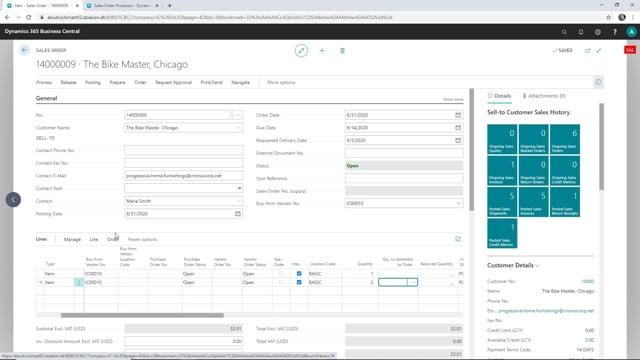
In Microsoft Dynamics 365 Business Central, you can set up a drop-ship sales order so the items your customer orders are shipped directly from your supply company. This saves you from handling the goods yourself. When the intercompany setup is in place, Business Central automatically fills in the buy-from vendor on both the sales order header and the sales lines, using your intercompany vendor.
The requested delivery date matters because it controls when the items need to be available in your supply company. Set it correctly so the supply side can plan accordingly.
Creating a drop-ship sales order in an intercompany setup
The scenario is straightforward. You’re a salesperson in your sales company, and you want your customer’s order to be fulfilled directly from your supply company rather than going through your own warehouse. Here’s how it works in practice.
Start by creating a new sales order and select your customer. Then set the requested delivery date. This date is important because it determines when the items must be available in your supply company.
The intercompany vendor fills in automatically
Once you’ve chosen the customer, you’ll notice that the buy-from vendor is filled in automatically with your intercompany vendor. This happens because of the configuration in the intercompany app setup. You don’t have to enter it manually.
Move down to the sales lines and choose the items your customer wants to buy. Here too, the buy-from vendor number is filled in automatically for each line. In this example, you can add a couple of different items and adjust the quantities, for instance taking two of one of them.
With the customer, delivery date, and items in place, the sales order is complete and ready to drive the drop-ship process from your supply company.
Q&A
What does the intercompany vendor do on a drop-ship sales order?
The intercompany vendor is the supply company that ships the items directly to your customer. When the intercompany app setup is configured, Business Central fills in the buy-from vendor automatically on both the sales order header and the sales lines.
Why is the requested delivery date important on a drop-ship order?
The requested delivery date controls when the items need to be available in your supply company. Setting it correctly lets the supply side plan to have the goods ready in time.
Do I have to enter the buy-from vendor manually on each sales line?
No. With the intercompany setup in place, the buy-from vendor number is filled in automatically on each sales line as well as on the order header.