
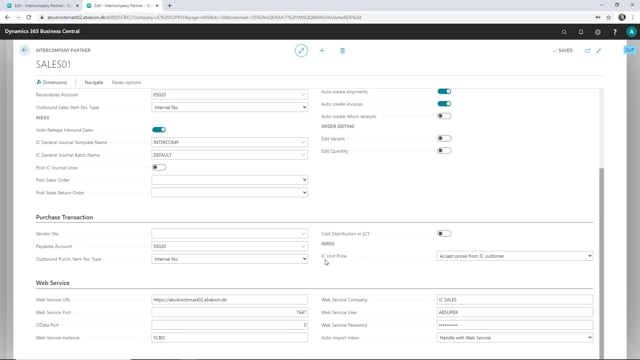


When you work with intercompany transactions in Business Central, you often need to apply a discount on the prices between your sales company and your supply company. You set this up using the IC unit price setting on your intercompany partner cards. In the supply company you choose to accept the prices from your intercompany customer (the sales company), and in the sales company you define the actual discount on the intercompany partner card.
In the sales company you can choose whether the discount applies to the purchase prices or the sales prices, and then you enter the price you want to use between the companies.
Why you need discounts between intercompany partners
When working with intercompany transactions, you may need some form of discount between your sales company and your supply company on the prices you use. This lets the two companies trade with each other at agreed internal prices rather than at standard list prices.
Setting up the IC unit price in the supply company
Start in your supply company and open the intercompany partner card for your sales company. Here you can define in the IC unit price how you want to use the prices.
If you want a discount between your companies, you need to accept the prices from your intercompany customer, which in this case is your sales company. This tells the supply company to take the prices from the sales company as the basis for the transaction.
Defining the discount in the sales company
Next, switch to the sales company and open the intercompany partner card for the supply company. This is where you define the discount you want to use between the companies.
You have two options for where the discount comes from. You can use the discount from the purchase prices or from the sales prices. Once you have chosen, you enter the price you want to use between the companies.
Q&A
Where do you set up intercompany discounts in Business Central?
You set them up on the intercompany partner cards in both companies. In the supply company you use the IC unit price setting and accept the prices from your intercompany customer. In the sales company you define the discount on the intercompany partner card for the supply company.
Can you base the intercompany discount on purchase or sales prices?
Yes. In the sales company you can choose whether the discount applies to the purchase prices or the sales prices, and then enter the price you want to use between the companies.
Which company accepts the prices in an intercompany setup with a discount?
The supply company accepts the prices from the intercompany customer, which is the sales company. You configure this in the IC unit price setting on the intercompany partner card in the supply company.