
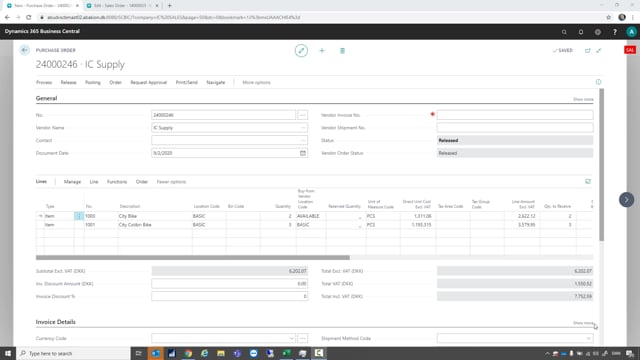


When you work with intercompany trade in Business Central, you can change the quantity on a released purchase order in your sales company and have that change flow automatically to the matching sales order in your supply company. This works as long as nothing has been shipped on the sales order yet. To make the update take effect, you reopen the purchase order, change the quantity on the line, and release the order again.
How intercompany orders connect across companies
In an intercompany setup, you have a main sales company and a supply company. When you create a purchase order in the sales company and release it, Business Central automatically creates a matching sales order in the supply company. The two documents are linked, so the information stays in sync between the companies.
Changing the quantity on a released purchase order
Sometimes you realize after releasing the purchase order that you need more of one of the items. To change the quantity, follow these steps:
- Reopen the purchase order in your sales company.
- Change the quantity on the relevant line.
- Release the order again.
When you release the order the second time, the linked sales order in the supply company is updated with the new quantity.
Verifying the update in the supply company
To confirm the change went through, go to the supply company and open the corresponding sales order. Refresh the page, and you will see that the quantity has been updated to match the change you made in the purchase order.
When you can no longer change the quantity
This works only as long as nothing has been shipped on the sales order in the supply company. Once shipment has started, the quantity can no longer be updated this way. So make any quantity adjustments before the supply company ships the items.
Q&A
How do I update the quantity on an intercompany order in Business Central?
Reopen the purchase order in your sales company, change the quantity on the line, and release the order again. The linked sales order in the supply company is updated automatically.
Why does my intercompany sales order not update when I change the quantity?
The sales order in the supply company only updates when you release the purchase order again after making the change. Reopening and editing the order is not enough on its own. Also check that nothing has been shipped on the sales order yet, because shipped lines can no longer be updated this way.
Can I change the quantity on an intercompany order after items have been shipped?
No. You can only update the quantity as long as nothing has been shipped on the sales order in the supply company. Make any adjustments before shipment starts.