
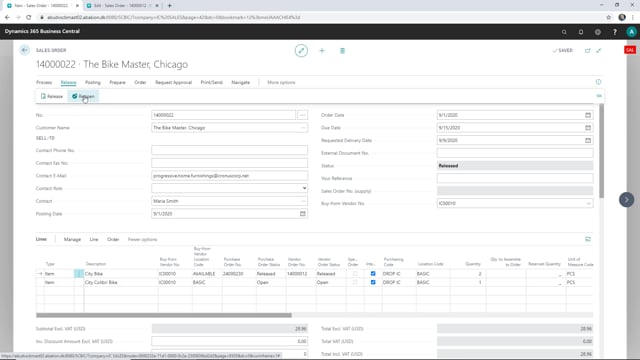


When you cannot deliver everything on a sales order and agree with the customer to cancel the remaining quantity, you need to adjust both the sales order and the connected order in the supply company. This is common in intercompany setups where one company sells and another supplies.
To handle a partial delivery that you close early, ship and invoice the quantity you can deliver, then reopen the sales order and change the quantity on the lines to match what was actually shipped. After you release the order again, the quantity updates automatically in the supply company so you can close both orders.
This prevents orders from sitting open and waiting for a shipment that will never happen.
Handling a sales order you cannot fully deliver
Sometimes you have a sales order where you cannot deliver everything that was ordered. You agree with the customer that they will not receive the rest of what they ordered, and you need a clean way to close out the order.
In this scenario, some of the items on the sales order have already been shipped, but the last part cannot be shipped at all. The customer is invoiced for the amount that was actually delivered, and the invoice is posted in the sales company.
Adjusting the quantity to match what was shipped
Once you have shipped and invoiced the part you can deliver, you need to fix the rest of the order. The goal is to remove the outstanding quantity and send the update to the supply company so the order does not stay open.
To do this, reopen the sales order and change the quantity so the lines match what was actually delivered. For example, if only one unit was shipped, set the quantity to one. Then release the order again.
Updating the supply company and closing both orders
When you go to the supply company after releasing the adjusted order, the quantity is updated there as well. The change flows through automatically, so you do not have to make the same correction twice.
With the quantities matching in both companies, you can continue with the order and close both the sales order and the supply order. Neither will be left open waiting to ship the rest.
Q&A
How do you close a sales order when you cannot deliver everything?
Ship and invoice the quantity you can deliver, then reopen the sales order and change the quantity on the lines to match what was actually shipped. Release the order again to update the connected supply company, then close both orders.
What happens to the supply company order when you adjust the sales order quantity?
When you reopen the sales order, change the quantity to match the delivered amount, and release the order again, the quantity updates automatically in the supply company. You do not need to make the correction separately in both companies.
Why should you adjust the quantity instead of leaving the order open?
If you leave the order open, it stays in the system waiting to ship the rest, even though you have agreed with the customer that the remaining items will not be delivered. Adjusting the quantity lets you close both orders cleanly.