
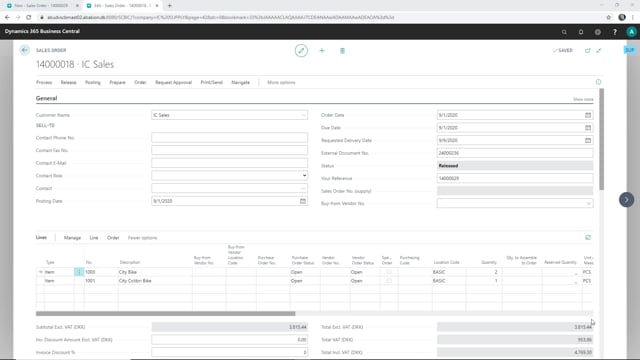


If you run an intercompany setup in Microsoft Dynamics 365 Business Central, you can ship a sales order in your supply company and have the linked order in your sales company update automatically. When you post the shipment in the supply company, Business Central receives the linked drop-ship purchase order in the sales company without any extra manual steps.
This works because the sales order in the supply company is created from a sales order in the sales company, and the two are connected through a drop-ship purchase order. Posting the shipment on one side triggers the receipt on the other.
How the intercompany drop-ship flow works
The starting point is a sales order in the supply company that was created from a sales order in the sales company. The two companies are linked, so the order in the supply company knows where it belongs.
When you open the sales order in the supply company, you can see that nothing has been shipped yet. You then post the shipment in the usual way. The order is now marked as shipped in the supply company.
What happens in the sales company
Once the shipment is posted in the supply company, the effect carries over to the sales company. If you open the sales order in the sales company and refresh it, you can see that the order is now shipped there as well.
The reason is the linked drop-ship order. The purchase order tied to the sales order in the sales company is received automatically when the supply company posts its shipment. You do not have to register the receipt manually. The two posting actions stay in sync across the companies.
What this means for your daily work
For day-to-day operations, this means one posting action keeps both companies aligned. You post the shipment once in the supply company, and the sales company reflects the same status. That reduces double handling and keeps the inventory and order status consistent across the intercompany setup.
Q&A
What happens when you post a shipment in the supply company in an intercompany drop-ship setup?
The order is marked as shipped in the supply company, and the linked drop-ship purchase order in the sales company is received automatically. The sales order in the sales company shows as shipped once you refresh it.
Do you have to register the receipt manually in the sales company?
No. Posting the shipment in the supply company automatically triggers the receipt of the linked drop-ship purchase order in the sales company.
Why do the two orders stay in sync?
The sales order in the supply company is created from the sales order in the sales company, and the two are connected through a drop-ship purchase order. Because they are linked, posting the shipment on one side updates the status on the other.