
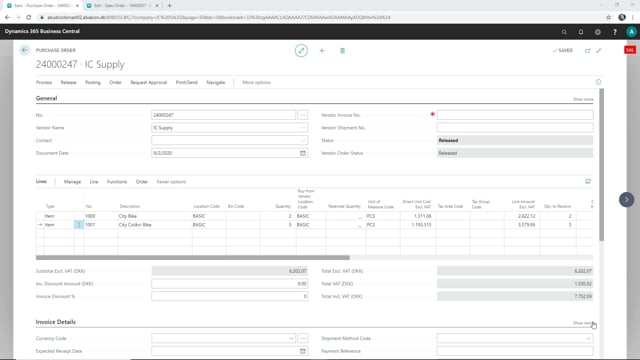


This article explains how to handle the goods receipt step in an intercompany trade flow in Microsoft Dynamics 365 Business Central. When your supply company ships items against an intercompany sales order, you receive those items manually in your sales company by posting a receipt on the purchase order. The shipment and receipt are not automatically synchronised. You post the receipt in the receiving company when the goods physically arrive.
The intercompany setup works like this: you create a purchase order in your sales company, which automatically generates a sales order in your supply company. The supply company ships the items from that sales order. You then post the receipt on the purchase order in your sales company when the truck actually delivers the goods.
The intercompany order flow between sales company and supply company
In an intercompany setup you have two companies in play. In this example, the sales company is the main company that places the order, and the supply company is the one that fulfils it.
It starts with a purchase order in the sales company. When you send that purchase order to the supply company, it creates a matching sales order on the other side. From there, the supply company picks and ships the items against that sales order.
If you check the supply company, you can see the sales order and confirm that it has been shipped. So far everything has happened in the supply company.
Posting the goods receipt in the sales company
The shipment from the supply company does not automatically update the purchase order in the sales company. The receipt is a separate, manual step.
At some point the items physically arrive, on a truck or however the goods come in. When they do, you go to the purchase order in your sales company and post the receipt. That tells Business Central that the items have actually landed at your location.
After you post the receipt, the purchase order in the sales company reflects that you have received the items sent from the supply company. The two sides of the trade are now in sync: shipped on the supply side, received on the sales side.
Why the receipt stays manual
Keeping the receipt as a manual posting matches how goods actually move. The supply company can ship today, but the items might not arrive at your warehouse until later. By posting the receipt when the goods physically arrive, your inventory and order status stay accurate and reflect reality rather than an automatic assumption.
Q&A
What happens when you send a purchase order to a supply company in an intercompany setup?
Sending the purchase order from your sales company automatically creates a matching sales order in the supply company. The supply company then ships the items against that sales order.
Is the goods receipt posted automatically when the supply company ships?
No. The shipment in the supply company does not automatically post the receipt in your sales company. You post the receipt manually on the purchase order when the items physically arrive.
Where do you post the receipt for intercompany items?
You post the receipt on the purchase order in your sales company, the company that placed the order and is receiving the goods.
Why is the receipt step kept manual instead of automatic?
Because the supply company can ship before the goods arrive. Posting the receipt manually when the items land keeps your inventory and order status accurate.