
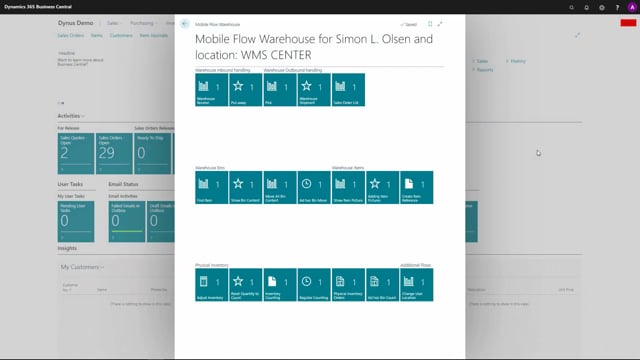


Warehouse Mobile in Business Central uses guided flows to simplify warehouse registrations. You can hand a scanner to an employee with little knowledge of Business Central or warehouse processes, and the guided flow walks them through each step.
The guided flow lets you register a warehouse receipt by scanning or entering a purchase order number, or an item number if you do not have the order number. The system finds the open or released warehouse receipt for you.
Guided flows reduce registration errors and speed up warehouse work compared to finding and printing documents manually in Business Central. Combining the flow with barcode functionality further decreases errors.
Why guided flows make warehouse registration easier
One of the most common reasons for using Warehouse Mobile is the guided flow and the easy registration it brings to Business Central. You can take an employee who is not very familiar with Business Central or warehouse functionality, give them a scanner, and have them start working straight away.
Business Central functionality can be complex for many users. Opening a warehouse receipt from the warehouse receipt menu means dealing with a document that is complicated to understand. Even finding the right document is a challenge. Are you looking for a warehouse receipt or an inventory receipt? Which type of document do you need, and which journal are you supposed to use? These are the kinds of questions that slow people down.
The guided flow removes that uncertainty. It leads the user through the process step by step, so they do not need to know the underlying document structure to get the job done.
How the warehouse receipt flow works in practice
If you are working in the warehouse receive area, you tell the warehouse receive guide to use a warehouse receive first and then a put-away. From there it is a guided flow.
When you open the package or the pallet, you state the purchase order number. If you do not have that number, you can simply enter the item number instead. The system then finds the open or released warehouse receipt and guides you through the rest of the flow.
Faster registrations and fewer errors
The functionality is quick and easy to use. Doing these registrations through the flow is much faster than finding the document in Business Central, printing it out, and working from paper.
This optimises performance in the inventory and decreases errors in the registrations. The improvement is even greater if you use the barcode functionality that comes with the solution.
Q&A
What is the main benefit of using guided flows in Warehouse Mobile?
Guided flows let employees who are not familiar with Business Central or warehouse functionality start working with just a scanner. The flow leads them through each step, so they do not need to understand the underlying documents.
How do you register a warehouse receipt using the guided flow?
You tell the warehouse receive guide to use a warehouse receive followed by a put-away. When you open the package or pallet, you enter the purchase order number. If you do not have it, you can enter the item number instead, and the system finds the open or released warehouse receipt for you.
Does the guided flow reduce registration errors?
Yes. It optimises inventory performance and decreases errors in registrations, especially when combined with the barcode functionality.