
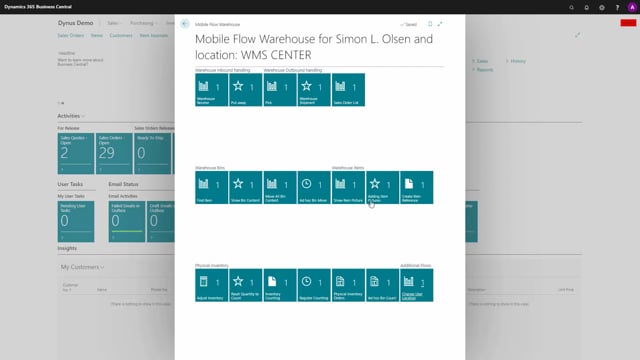


The mobile warehouse functionality in Business Central adapts to the location you are assigned to as a warehouse employee. The tiles and actions you see in the mobile flow depend directly on the warehouse setup of that location. A full WMS location with directed put-away and pick shows receive, put-away, pick, shipment, and bin functions. A basic location with no warehouse requirements lets you receive and ship directly on the order documents instead.
You can be assigned to several locations, but you work on one location at a time. Switching location changes which documents and actions are available, because the system reads the setup on the location you are currently working on.
How mobile flows respond to your assigned location
The mobile warehouse flows react to the location you are assigned to. As a warehouse employee, you can be set up on different locations, but you always work on one location at a time. The location you are currently working on determines what you see and what you can do in the mobile flow.
The header in the mobile flow shows which location you are working on. When you switch to another location, the header updates to reflect it.
Location setup determines which tiles appear
The warehouse setup on the location card controls which tiles and actions show up in the mobile flow. There are three typical setups to be aware of:
- Full WMS location: This location has the directed put-away and pick checkmark enabled. It requires receipts, shipments, and bins for everything. In the mobile flow you see warehouse receive and put-away, picks, warehouse shipment, and all bin functionality, such as finding an item on a specific bin and showing bin content.
- Distribute location: This location requires put-aways, picks, and bins. Here you get access to documents like inventory put-away, transfer documents, and pick for sales.
- Basic location: This location requires nothing from a warehouse perspective. Most actions disappear because you can receive directly on a purchase order and ship directly on a sales order. All bin functionality is gone.
Switching location changes the available actions
When you change your location in the mobile flow, the available actions change with it. If you switch from the WMS location to the distribute location, the header shows “distribute” and you get access to the documents and actions that match that setup, such as inventory put-away, transfers, and pick for sales.
If you then switch to a simple location, most of the actions disappear, because that location does not require warehouse handling. The mobile flow automatically uses the setup on the location you are working on, so you only ever see the functions that are relevant for that location.
Q&A
Can a warehouse employee be assigned to more than one location?
Yes. You can be set up on several locations, but you work on one location at a time. You switch between them in the mobile flow, and the header shows which location you are currently working on.
What decides which tiles and actions appear in the mobile warehouse flow?
The warehouse setup on the location card decides it. A full WMS location with directed put-away and pick shows receive, put-away, pick, shipment, and bin functions. A basic location with no warehouse requirements shows far fewer actions, because you receive and ship directly on the order documents.
What happens when I switch to a basic location with no warehouse setup?
Most actions disappear. You can receive directly on a purchase order and ship directly on a sales order, and all bin functionality is removed. The mobile flow only shows what is relevant for that location.
What does a distribute location give access to in the mobile flow?
A distribute location requires put-aways, picks, and bins. It gives you access to documents such as inventory put-away, transfer documents, and pick for sales.