
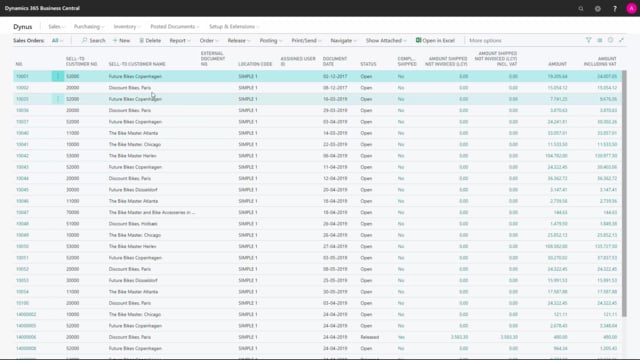


Sales order backlogs in Business Central happen when you ship less than the ordered quantity and the remaining quantity stays open on the sales line. If you leave these backlogs unhandled, they create demand in your MRP planning, sometimes dated years in the past, which confuses your planner and undermines your attempts to keep the system clean.
You should define a clear process for handling backlogs. Decide who is responsible, whether you reopen and adjust the order, delete it, or ship it. Involve your sales people, inventory people, and planners so everyone knows what to do with an open sales order line that never got shipped.
What a sales order backlog looks like in Business Central
A backlog occurs when you don’t ship the full expected quantity on a sales order. The order stays open with a remaining quantity on one or more lines. This is a common situation we see with customers.
Take a typical example. You open a sales order and the document date tells you it’s old. Inside, the order has five lines with different quantities. If you scroll right to the quantity shipped and quantity to ship columns, you see a remaining quantity of eight on one of the lines. The order dates back two years.
When you ask why the line is still open, nobody knows. Nobody remembers why it wasn’t shipped, and the customer has forgotten about it too. Without a strategy, these lines just sit there.
Why unhandled backlogs cause problems in MRP planning
The real problem is what an open sales order line does to your planning. The remaining quantity creates a demand in the MRP planning. If the line is two years old, the MRP sees a demand dated two years ago.
Your planner then can’t understand what’s happening on that item. Even when the team tries to clean things up, these forgotten backlog lines keep generating demand that makes no sense.
How to handle sales order backlogs
You need a strategy for finding all the lines with backlogs and deciding what to do with each one. There are different approaches, and the right one depends on the situation.
Start by clarifying these questions:
- Is the quantity actually still supposed to be shipped? If so, explain why and ship it.
- Should the order or document be deleted instead?
- Who is responsible: the sales people, the inventory people, or the planner?
- Do you need to reopen the order to adjust or close it?
The key is to define this as a process that lives outside Business Central, agreed between your sales people, your inventory people, and your planners. Everyone needs to know what to do with a sales order backlog so the open lines don’t keep distorting your planning.
Q&A
What is a sales order backlog in Business Central?
A backlog is a remaining open quantity on a sales order line that occurs when you ship less than the ordered quantity. The line stays open with a quantity to ship until you handle it.
Why do old sales order backlogs cause planning problems?
An open sales order line creates a demand in the MRP planning. If the line is old, the MRP registers a demand with an old date, which confuses the planner and makes it hard to understand what is happening on the item.
Who should be responsible for handling sales order backlogs?
That depends on your organisation. You should decide whether the sales people, inventory people, or planner owns the task, and define a clear process between them on what to do with open backlog lines.
What can you do with a sales order line that has a backlog?
You can ship the remaining quantity if it’s still expected, reopen the order to adjust it, or delete the order or document. The right choice depends on whether the delivery is still relevant.