


I need more context to work with, but let me analyze what’s present in this transcription.
The transcription appears to reference “Post sale shipments” / “poster sale shipments” / “post of sale shipment” — these are inconsistent and likely refer to **Posted Sales Shipments** in Microsoft Dynamics 365 Business Central. “Tell me” refers to the **Tell Me** search feature in Business Central.
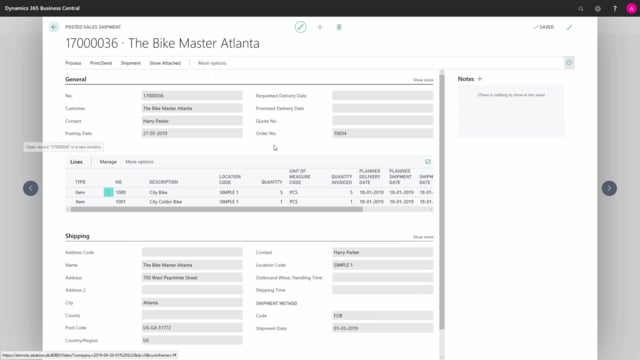
Posted Sales Shipments in Microsoft Dynamics 365 Business Central give you a complete record of what you have shipped to customers and on which dates. You find them under Sales, or by using the Tell Me search function. Open any shipment by double-clicking it to see the shipped lines and shipment dates.
Where to find Posted Sales Shipments in Business Central
You can reach the Posted Sales Shipments in two ways. Go to Sales and open Posted Shipments, or use the Tell Me search and type the name to jump straight to the list.
The list shows all the posted sales shipments in your system. You can search for a specific one if you know what you are looking for, or scroll through the full list to find it.
Opening a Posted Sales Shipment to see shipment details
Open a shipment by double-clicking the line. Inside the document you can see the posted sales shipment itself, including what you shipped and on which dates. This gives you a clear record of each delivery to the customer.
Q&A
Where do I find Posted Sales Shipments in Business Central?
You find them under Sales, then Posted Shipments. You can also use the Tell Me search function and type the name to open the list directly.
How do I see what was shipped on a Posted Sales Shipment?
Double-click the shipment in the list to open it. Inside the document you can see the shipped lines and the dates on which the goods were shipped.
How do I locate a specific Posted Sales Shipment?
You can search for a specific shipment directly in the list, or scroll down through all the posted sales shipments in the system to find the one you need.