
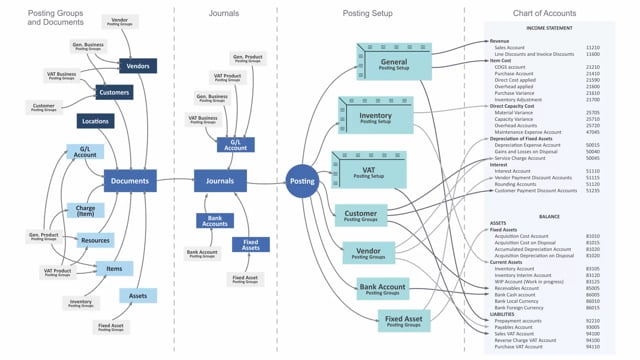


The bank account posting group in Business Central controls which general ledger accounts your bank transactions post to. You set up a posting group with a name and the relevant G/L accounts, then link it to your bank accounts. When you post payments or receivables through bank journals, payment journals, or receivable journals, the bank account’s posting group determines exactly which accounts the entries land on.
This setup means you do not have to specify the G/L account manually every time you process a payment or a receipt. The posting group handles it automatically based on the bank account you use.
What the bank account posting group does in Business Central
The bank account posting group determines which accounts to post to when you use your bank accounts in journals. It is a small but important piece of setup that connects your bank accounts to the general ledger.
You set up the posting group as a record in Business Central. On that record you add a name and the relevant accounts for the bank. Once the posting group exists, you assign it to the bank accounts you have configured in the system.
How posting groups connect bank accounts to journals
Your bank accounts are used in several types of journals:
- Bank journals
- Payment journals
- Receivable journals
You use these journals to handle your payments and receivables. When you post a transaction, the bank account you select determines which posting group applies. The posting group then controls which G/L accounts the entries post to.
The benefit is consistency. Each bank account carries its own posting group, so the system always posts to the correct accounts for that specific bank, without manual lookup during posting.
Q&A
What is the bank account posting group used for in Business Central?
It determines which general ledger accounts your bank transactions post to when you use your bank accounts in journals.
How do you set up a bank account posting group?
You create a record in Business Central, add a name and the relevant accounts, and then assign the posting group to your bank accounts.
Which journals use the bank account posting group?
Bank journals, payment journals, and receivable journals use it when you process payments and receivables.
How does the system know which accounts to post to?
The bank account you select in the journal determines which posting group applies, and that posting group controls the accounts the entries post to.