


“`html
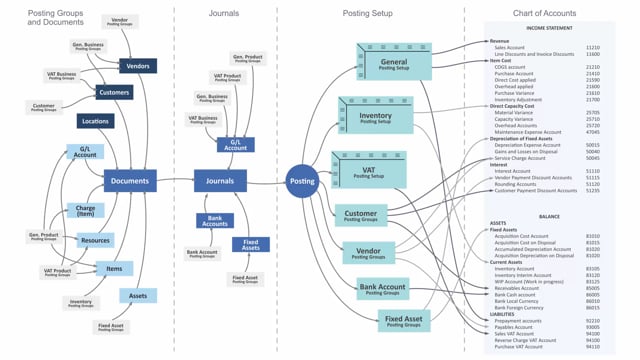
VAT posting groups in Business Central determine how VAT is calculated and posted. There are two types you need to understand. The VAT business posting group defines whom you buy from or sell to. The VAT product posting group defines what you buy or sell.
You assign the VAT business posting group to customers and vendors, and to GL accounts if you post directly in journals. You assign the VAT product posting group to items, resources, and GL accounts used for direct postings.
The combination of these two groups flows into your documents and journals. The VAT posting setup uses this combination to determine which balance account the VAT is posted to. VAT is always a balance account in the system.
How VAT posting groups work in Business Central
VAT posting groups are the mechanism Business Central uses to determine the VAT setup on a transaction. There are two groups working together: the VAT business posting group and the VAT product posting group.
The VAT business posting group answers the question of whom you are trading with. You set it up typically on customers and vendors. You can also set it on GL accounts if you post directly in journals.
The VAT product posting group answers the question of what you are trading. You set it up on the things you buy or sell, which means items and resources. You also set it on GL accounts for direct postings in journals.
How the groups flow into documents and journals
When you create a document, both posting groups come along. The VAT business posting group comes from the customer or vendor, and the VAT product posting group comes from the item, resource, or GL account. These values flow from the document into the journals when you post.
The combination of the two groups points to a line in the VAT posting setup. This is where the actual VAT calculation and account determination happens.
What the VAT posting setup controls
The VAT posting setup uses the combination of the VAT business posting group and the VAT product posting group to determine where the VAT lands in the chart of accounts. VAT is always posted to a balance account in Business Central, so the setup tells the system which balance account to use for each combination.
Q&A
What is the difference between a VAT business posting group and a VAT product posting group?
The VAT business posting group defines whom you buy from or sell to, and you assign it to customers and vendors. The VAT product posting group defines what you buy or sell, and you assign it to items, resources, and GL accounts.
Where do you assign VAT posting groups in Business Central?
You assign the VAT business posting group to customers and vendors, and to GL accounts for direct journal postings. You assign the VAT product posting group to items, resources, and GL accounts for direct journal postings.
What determines which account VAT is posted to?
The VAT posting setup determines the account. It uses the combination of the VAT business posting group and the VAT product posting group to point to the correct balance account, since VAT is always posted to a balance account.
“`