
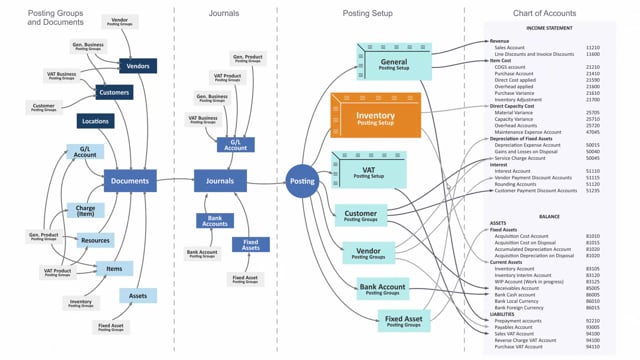


The inventory posting setup in Business Central controls which inventory accounts on the balance sheet your items are posted to when you receive or sell them. It works as a matrix built from two dimensions: the location code (where you post from) and the inventory posting group code (what kind of item you post). Together these determine which general ledger accounts the postings land in.
You set inventory posting groups on the item card. These groups can reflect categories such as raw materials, resale, semi-finished, or finished goods. The location code comes from the warehouse where the transaction happens. The combination of the two decides the exact accounts in your chart of accounts.
The setup connects to your daily transactions through documents. Both the location and the item carry their setup into sales orders, purchase orders, and similar documents. When you post these documents, the values transfer into journals, and the inventory posting setup determines the final accounts.
What the inventory posting setup does in Business Central
The inventory posting setup determines where in your inventory accounts on the balance sheet items should be posted when you receive or sell them. If you open the inventory posting setup in Business Central, you see it is a combination of location code and inventory posting group code. That combination defines the accounts the system posts into.
How location and inventory posting groups work together
The setup is built from two sources: your location and your inventory posting groups. The inventory posting groups apply to items, which means you define where your items should be posted on the balance sheet when you receive or sell them on your inventory.
Both your location and your items apply to documents such as sales orders and purchase orders. When you post, those values transfer into journals, and the inventory posting setup decides which accounts in your chart of accounts they post into.
Reading the inventory posting setup as a matrix
The inventory posting setup is a matrix that answers two questions: what kind of item am I posting, and where am I posting it from. The “what kind” is set on the item card and can be raw materials, resale, semi-finished, finished, or whatever categories you choose to set up. The “where from” is your location code.
For a specific combination, for example raw material from your main warehouse, the setup determines which accounts in your chart of accounts the posting hits. Each other combination of location and posting group works the same way, pointing to its own set of accounts.
Q&A
What does the inventory posting setup control in Business Central?
It controls which inventory accounts on the balance sheet your items are posted to when you receive or sell them. The accounts are determined by the combination of location code and inventory posting group code.
What two dimensions make up the inventory posting setup?
The location code, which tells you where you are posting from, and the inventory posting group code, which tells you what kind of item you are posting. The combination of the two decides the general ledger accounts.
Where do you set the inventory posting group?
On the item card. The group can represent categories such as raw materials, resale, semi-finished, or finished goods, depending on how you set it up.
How does the inventory posting setup connect to documents and journals?
Both the location and the item carry their setup into documents such as sales orders and purchase orders. When you post these documents, the values transfer into journals, and the inventory posting setup determines the final accounts in your chart of accounts.