


Understanding the general posting setup in Business Central
The general posting setup in Business Central is a matrix that controls where your postings end up in the chart of accounts. You combine two dimensions to define this: the general business posting group and the general product posting group. The general business posting group covers who you sell to or buy from, such as domestic, EU, export, and intercompany. The general product posting group covers what you sell or buy, such as items, resources, and G/L accounts. Where these two groups intersect, you define which revenue accounts, cost accounts, and prepayment accounts the posting affects. This matrix approach lets you set up posting once on your customers, vendors, and products, and the system then routes every transaction to the correct account automatically.
How the posting setup fits together in Business Central
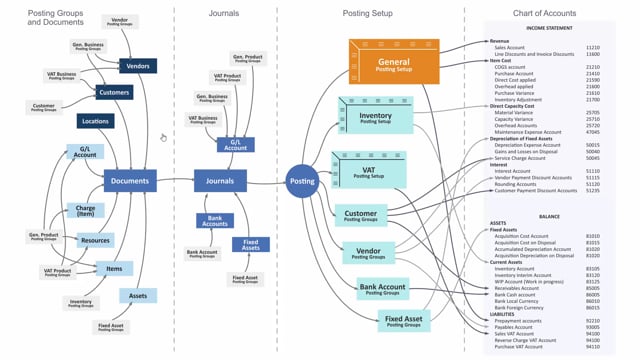
If you draw out all the posting setup in Business Central, you have three main building blocks: your posting groups, your journal posting setup, and your chart of accounts. The general posting setup ties these together. It determines where transactions land when you post.
The posting groups are defined in separate tables. They apply to two things: the items you sell or buy, and the parties you sell to or buy from. Your general business posting group applies to customers and vendors. Your general product posting group applies to items, resources, and also to G/L accounts if you are selling or buying directly on a G/L account.
How posting groups flow to documents and journals
When you create a new document, the posting groups transfer onto that document automatically. This works for purchase orders, sales orders, invoices, and similar documents.
You can also apply the posting groups directly to journals. When you post a document, it creates a journal line that is then posted. If you create journals manually, you can change the general business posting group and the general product posting group directly on the journal line.
How the general posting setup matrix determines accounts
At the moment of posting, the general posting setup acts as a matrix. It combines the general business posting group and the general product posting group to determine where everything goes: into your revenue accounts, your cost accounts, and your prepayment accounts.
The general business posting group answers the question of who you sell to or buy from. Typical values are domestic, EU, export, and intercompany. The general product posting group answers the question of what you sell or buy.
From these two dimensions you find the combinations. If you sell to a domestic customer using the product group “item,” the matrix defines specific accounts in the chart of accounts to post to. If you sell to an EU customer using the product group “services,” the matrix points to different accounts. This means you set up your customers, vendors, and everything you sell or buy once, and the combination decides which accounts in the chart of accounts the posting affects.
Q&A
What is the general posting setup in Business Central?
It is a matrix that combines the general business posting group and the general product posting group to determine which accounts in the chart of accounts a transaction posts to, including revenue accounts, cost accounts, and prepayment accounts.
What is the difference between the general business posting group and the general product posting group?
The general business posting group applies to customers and vendors and defines who you sell to or buy from, such as domestic, EU, export, or intercompany. The general product posting group applies to items, resources, and G/L accounts and defines what you sell or buy.
Can I change the posting groups on a manual journal?
Yes. When you create a journal manually, you can change both the general business posting group and the general product posting group directly on the journal line.
How do posting groups end up on documents like sales and purchase orders?
When you create a new document, the relevant posting groups transfer to that document automatically from the customer, vendor, item, or resource setup. This applies to purchase orders, sales orders, invoices, and similar documents.
Why do two different sales scenarios post to different accounts?
Because the account is determined by the combination in the matrix. Selling an item to a domestic customer uses one set of accounts, while selling services to an EU customer uses another, since each combination of business and product posting group has its own defined accounts.