
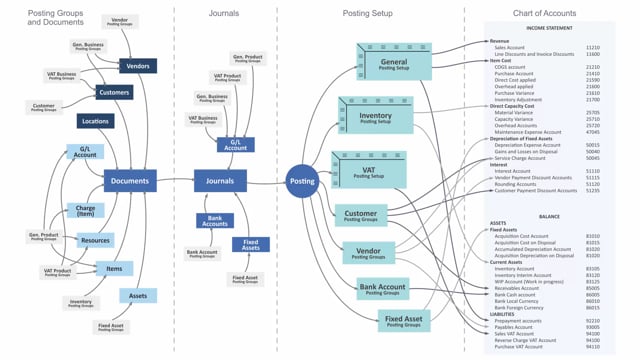


What the vendor posting group does in Business Central
The vendor posting group determines which accounts in your chart of accounts get the entries when you work with vendors. Most importantly, it decides your payables account in the balance sheet, but it also controls discount accounts and service charge accounts in the income statement.
The vendor posting groups are defined in their own table. From there, you assign a posting group to each vendor you create in the system. That link is what makes the posting happen automatically later on.
When the vendor posting group applies
When you create new documents, typically purchase documents, the vendor posting group from the vendor applies to those documents. It also applies when the system creates journal lines from a document as you post it.
The same logic works the other way around. When you create journal lines manually, for instance in a purchase journal, the vendor posting group still applies.
At the moment you post the documents or the journal, the vendor posting group has already determined which accounts to post into. That covers the payables account in the balance, plus the discount and service charge accounts in the income statement.
Why this setup matters
Because the posting group is defined once in its own table and then reused across every vendor and document, you keep your account assignments consistent. You set up the rule once, apply it to the right vendors, and the system handles the rest whenever you post. That is what keeps your purchase transactions landing on the correct accounts without you having to pick them manually each time.
Q&A
What does the vendor posting group determine in Business Central?
It determines which accounts in your chart of accounts receive the entries. This includes the payables account in the balance sheet, as well as discount accounts and service charge accounts in the income statement.
How do you connect a vendor to a vendor posting group?
The vendor posting groups are defined in their own table. You then assign a posting group to each vendor when you create the vendor in the system.
When does the vendor posting group apply?
It applies when you create purchase documents, when journal lines are created from a document during posting, and when you create journal lines manually, for example in a purchase journal.
Which accounts does the vendor posting group affect?
It affects the payables account in the balance, along with the discount accounts and the service charge accounts in the income statement.