
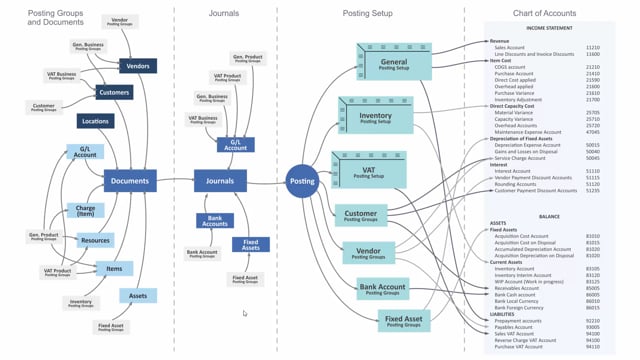


The general business posting group in Business Central defines who you are buying from or selling to. It is part of the matrix in the general posting setup that determines which G/L accounts your transactions post into.
You assign the general business posting group to customers and vendors. You can also assign it directly on a G/L account when you want to post directly in journals, such as sales and purchase journals.
When you post a transaction, the system uses the combination of the general business posting group and the general product posting group to find the correct account. The general business posting group handles the “who” and the general product posting group handles the “what”.
What the general business posting group defines in Business Central
The general business posting group states who you are trading with. It tells the system whether a transaction relates to a customer you sell to or a vendor you buy from. It is defined in its own table, and you then apply it where you need it.
In most setups you apply the general business posting group to customers or vendors. That means every time you trade with that party, the system already knows which group to use.
Applying the general business posting group directly on a G/L account
You are not limited to customers and vendors. You can also apply the general business posting group directly on a G/L account. This is useful when you want to post directly in journals, for instance sales and purchase journals, without going through a document first.
In normal day-to-day work, however, most transactions run through documents such as sales orders, sales invoices and purchase documents.
How the general posting setup determines the account
The actual account selection happens through the general posting setup. This is a matrix built from two dimensions:
- The general business posting group, which determines who you sell to or buy from
- The general product posting group, which determines what you are trading
When you post, the system looks up the intersection of these two groups in the general posting setup and uses that to decide which account to post into. This is how the general business posting group works in practice.
Q&A
What does the general business posting group define in Business Central?
It defines who you are buying from or selling to. It identifies whether a transaction relates to a customer or a vendor and is part of the matrix that decides which accounts your postings go to.
Where do you assign the general business posting group?
You normally assign it to customers and vendors. You can also assign it directly on a G/L account when you want to post directly in journals, such as sales and purchase journals.
How does Business Central decide which account to post into?
The general posting setup uses a matrix of the general business posting group and the general product posting group. The combination of the two determines the account a transaction posts into.
What is the difference between the general business posting group and the general product posting group?
The general business posting group determines who you sell to or buy from. The general product posting group determines what you are trading. Together they point to the correct account in the general posting setup.