
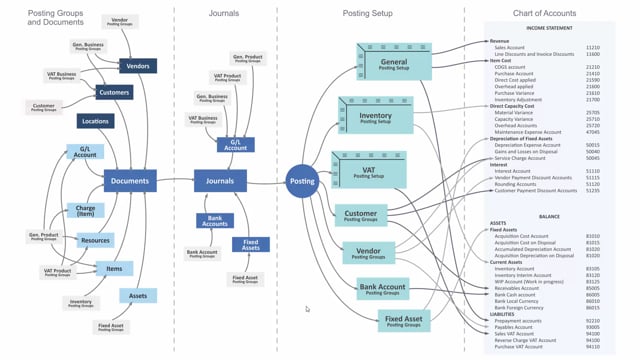


The Customer Posting Group in Business Central determines which Receivables account your customer transactions post to. You define one or more Customer Posting Groups and assign them to your customers. When you create documents or journals, the Customer Posting Group transfers to those records and controls the posting accounts.
The Receivables account is a balance sheet account. The Customer Posting Group also sets up discount accounts and service charge accounts, which post to your income statement.
How the Customer Posting Group determines the Receivables account
The Customer Posting Group is the setup that controls where your customer transactions land in the chart of accounts. You define your Customer Posting Groups, and each one is assigned to the customers in the system. A customer carries its posting group, and that group decides which accounts get used when you post.
How the Customer Posting Group transfers to documents and journals
When you create new documents or post journals directly, the Customer Posting Group transfers automatically to those documents and journals. So when you post, the system already knows which accounts to use, because they are defined on the Customer Posting Group.
Which accounts the Customer Posting Group controls
The Customer Posting Group holds the accounts that determine where your postings go. This includes:
- Receivables account – the balance sheet account where your customer receivables are posted.
- Discount accounts – posted in your income statement.
- Service charge account – used for service charges.
Q&A
What does the Customer Posting Group determine in Business Central?
It determines the Receivables account and other posting accounts such as discount accounts and the service charge account. The Receivables account is a balance sheet account, while the discount accounts post to the income statement.
How is the Customer Posting Group assigned?
You define Customer Posting Groups and assign them to your customers. Each customer carries a Customer Posting Group that controls how its transactions post.
What happens to the Customer Posting Group when you create documents or journals?
The Customer Posting Group transfers automatically to the documents and journals you create. When you post, the system uses the accounts defined on that posting group.