
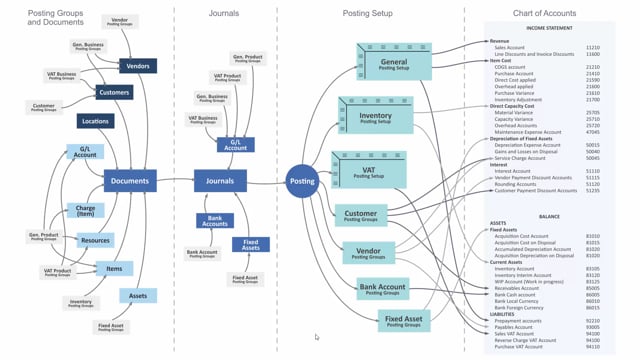


The inventory posting group in Business Central is set up only on items, not on customers or vendors. Once you assign an inventory posting group to an item, it carries through automatically to documents and the posting process. You do not need to apply it anywhere else.
The combination of location and inventory posting group determines which accounts the system uses. This includes the inventory asset account on the balance sheet and the variance account in the income statement.
How the inventory posting group works in Business Central
The inventory posting group is a simple concept once you see where it lives. Unlike some other posting groups, you only set it up in one place: on the items themselves. There is no need to assign it to customers, vendors, or other records.
You start by defining your inventory posting groups in the inventory posting group table. After that, you apply them to your items. From there, the posting group flows on to documents and continues through to the actual posting. You assign it once, and the system takes care of the rest.
How locations and posting groups determine the accounts
When you post, Business Central looks at the inventory posting setup. Here it uses the combination of two things: the location and the inventory posting group. That combination decides which accounts get used.
Specifically, it determines:
- The inventory asset account on the balance sheet
- The variance account in the income statement
This setup gives you control over how inventory is posted depending on where the goods are stored and which posting group the item belongs to. By combining location and posting group, you can route the same item to different accounts across different locations if you need that level of detail.
Q&A
Where do you set up the inventory posting group in Business Central?
You set up the inventory posting group only on items. First you define the groups in the inventory posting group table, then you assign them to items. You do not need to apply them to customers, vendors, or documents, because they flow automatically from the item through to posting.
What determines which inventory accounts Business Central uses when posting?
Business Central uses the combination of location and inventory posting group in the inventory posting setup. This combination determines the inventory asset account on the balance sheet and the variance account in the income statement.
Do you need to assign the inventory posting group to documents manually?
No. Once you assign the inventory posting group to an item, it flows automatically to documents and through to the posting. You assign it once on the item, and the system handles the rest.