
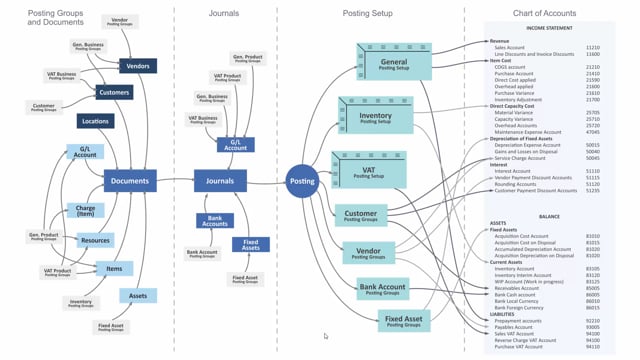


The fixed asset posting group in Business Central controls which accounts in your chart of accounts your fixed assets and depreciation post to. You set up these groups in the fixed asset posting group table and then assign them to your individual fixed assets.
You can buy or sell fixed assets directly on sales and purchase documents. You can also handle depreciation and write-ups or write-downs directly in a general ledger journal. In every case, the posting group decides which balance sheet and income statement accounts the transaction lands in.
What the fixed asset posting group does
The fixed asset posting group determines where in the chart of accounts your fixed assets and depreciation are posted. You set up the groups in the fixed asset posting group table, and they are then applied to the fixed assets in Business Central.
When you post a transaction, the posting group assigned to the fixed asset determines which account in the balance sheet and the income statement the amount should be posted to. This means the setup you do once on the posting group drives the accounting result every time you move that asset.
How fixed assets are posted in Business Central
You can work with fixed assets in several ways:
- Sales and purchase documents: Fixed assets can be sold or purchased directly on sales and purchase documents.
- General ledger journal: You can handle depreciation as well as writing your fixed assets up or down directly in a GL journal.
Regardless of which route you choose, the fixed asset posting group ties the transaction to the correct accounts in your chart of accounts.
Q&A
What does the fixed asset posting group control?
It controls which accounts in your chart of accounts your fixed assets and depreciation are posted to, covering both the balance sheet and the income statement.
Where do you set up fixed asset posting groups in Business Central?
You set them up in the fixed asset posting group table and then assign them to the individual fixed assets.
How can you post fixed asset transactions?
You can buy or sell fixed assets directly on sales and purchase documents, and you can handle depreciation or write-ups and write-downs directly in a general ledger journal.