
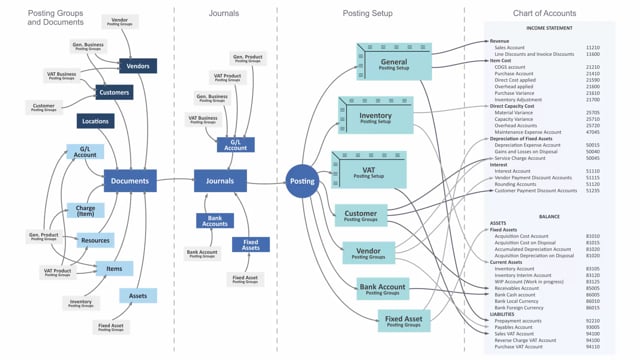


The general product posting group in Business Central determines what you are buying or selling, and it works together with the general business posting group to control which G/L accounts your transactions post to. You set it up in its own table and assign it to items, resources, item charges, and directly to G/L accounts when they are used on documents.
The value flows from the item or resource onto your sales and purchase documents, and from there into the journal line where you post. You can also enter it directly on a journal line when you post from a G/L account.
When you post, the general posting setup combines the general product posting group with the general business posting group to find the correct accounts in your chart of accounts.
What the general product posting group controls
The general product posting group tells Business Central what you are buying or selling. It is one of the two posting group types that the general posting setup uses to decide which G/L accounts to post to. Where the general business posting group describes who you trade with, the general product posting group describes what you trade.
You set up your general product posting groups in a table of their own. From there, you assign them to the records that need them.
Where you assign the general product posting group
You normally assign the general product posting group to items and resources. You can also assign it to item charges, and directly to G/L accounts when those accounts are used on documents. Assigning it to a G/L account can be helpful in cases where you post directly to that account from a document.
How the value flows from item to posting
The general product posting group follows the record through the process. It starts on the item or resource and copies onto the documents you create, such as sales documents and purchase documents. From the document, it carries forward to the journal line where the actual posting happens.
You can also bypass the document flow. When you enter a line in a journal directly from a G/L account, the general product posting group can apply to that journal line on its own.
How the general posting setup determines the accounts
When you post, the general posting setup takes the general product posting group and the general business posting group together. The combination of these two values determines which accounts in the chart of accounts your transaction posts to. This is what makes the general posting setup the link between your day-to-day transactions and your general ledger.
Q&A
What does the general product posting group do?
It determines what you are buying or selling. Combined with the general business posting group in the general posting setup, it controls which G/L accounts your transactions post to.
What records can you assign a general product posting group to?
You normally assign it to items and resources. You can also assign it to item charges and directly to G/L accounts when those accounts are used on documents.
How does the general product posting group end up on a posting?
It flows from the item or resource onto your sales and purchase documents, and then to the journal line where you post. You can also enter it directly on a journal line when you post from a G/L account.
How does Business Central decide which accounts to post to?
At posting, the general posting setup combines the general product posting group with the general business posting group. That combination determines which accounts in the chart of accounts the transaction posts to.