


If your work in progress (WIP) values in inventory do not match your general ledger, the cause is usually that expected cost posting to G/L is turned off in your Inventory Setup. Business Central calculates WIP on item ledger entries continuously, but it only posts the corresponding values to the general ledger when you run the Post Inventory Cost to G/L report or when expected cost posting is enabled.
You can find the difference using the Inventory Valuation – WIP report or the Inventory G/L Reconciliation matrix. Both show the gap between WIP calculated on value entries and the amount posted to your G/L accounts.
To reconcile WIP without permanently affecting performance, enable the “Expected Cost Posting to G/L” checkmark in Inventory Setup, run the Post Inventory Cost to G/L report so the values synchronise, and then remove the checkmark again. This avoids the extra postings and slower performance that continuous synchronisation causes in a live system.
Why WIP and inventory values are hard to reconcile in Business Central
Reconciling your work in progress against your inventory in the general ledger can be challenging. The reason comes down to how Business Central handles expected costs and when those costs reach the G/L.
If you look at your chart of accounts, you will find your inventory accounts, including your WIP account for finished goods. This is the account used for manufactured goods that are currently in production. In this example, the account shows around 167,000.
Finding the difference with the WIP report
To check the values, you would normally open the WIP report under report and analysis for production orders. You enter an end date, or just a date somewhere in the future, and run the report.
The report shows all your posted value on item ledger entries in production, alongside the value posted to G/L. On the last page of the example, the total value on value entries is 112,000, while the amount posted to G/L is 160,324. That leaves a difference of about 63,000.
Using the Inventory G/L Reconciliation matrix
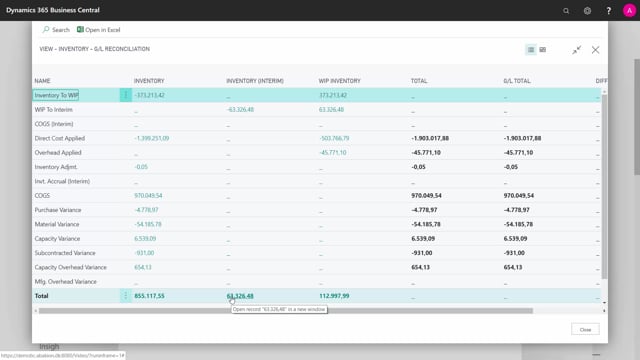
There is another way to find the same difference. Open the Inventory G/L Reconciliation, which is built to reconcile your inventory values against the general ledger. You can show a matrix with whatever filters you want, or run it with no filters at all.
The matrix calculates your WIP based on item ledger entries and compares it to what is posted in your chart of accounts. In the example, this confirms the same difference of 63,000.
Why the difference occurs
No matter what you do day to day, this difference is hard to get rid of. It would only disappear if you finished all your production orders and invoiced all your outstanding purchase orders, at which point it would go to zero.
The root cause is in your Inventory Setup. If you look there, you will likely find that the “Expected Cost Posting to G/L” checkmark is not set. That is usually a deliberate choice, because enabling it makes the system work slower. The trade-off is that with it switched off, your inventory values and your G/L are not synchronised continuously.
How to synchronise WIP with the general ledger
If you set the checkmark for expected cost posting to G/L, Business Central will tell you to run the cost posting to G/L. You do this with the standard Post Inventory Cost to G/L report, which you can run per entry or for everything. This posts all your inventory costs into the G/L so the two sides match.
When you run it, the amount it posts matches the difference you saw before. After posting, the G/L amount becomes 112,000. If you reopen the production WIP report and look at the last page again, the amount calculated on value entries and the amount posted to G/L are now synchronised.
Deciding whether to leave continuous posting on
With the checkmark set, your values stay synchronised all the time. The downside is that it requires more performance and a lot more posting. You have to consider whether that trade-off is worth it for your environment.
If you only want to reconcile your WIP occasionally, a practical approach is to set the checkmark, run the report so everything synchronises, and then remove the checkmark again. That way you get a clean reconciliation without forcing the extra posting to run continuously in your live system.
Q&A
Why don’t my WIP values match the general ledger in Business Central?
Because the “Expected Cost Posting to G/L” checkmark in Inventory Setup is turned off. Business Central calculates WIP on item ledger entries continuously, but the expected costs are not posted to the G/L until you run the Post Inventory Cost to G/L report or enable continuous posting.
How do I find the difference between WIP and the general ledger?
Use the production WIP report under report and analysis, where you can compare value posted on item ledger entries against value posted to G/L. You can also use the Inventory G/L Reconciliation matrix, which calculates WIP from item ledger entries and compares it to your chart of accounts.
How do I reconcile WIP without slowing down my live system?
Set the “Expected Cost Posting to G/L” checkmark in Inventory Setup, run the Post Inventory Cost to G/L report so the values synchronise, and then remove the checkmark again. This gives you a clean reconciliation without the extra postings running all the time.
What happens if I leave expected cost posting to G/L turned on?
Your inventory values and G/L stay synchronised continuously, but it requires more system performance and generates a lot more posting. You should weigh that trade-off against the benefit of always-matching values.
Will the WIP difference ever disappear on its own?
Yes, but only when you finish all your production orders and invoice all your outstanding purchase orders. At that point the WIP difference goes to zero.