
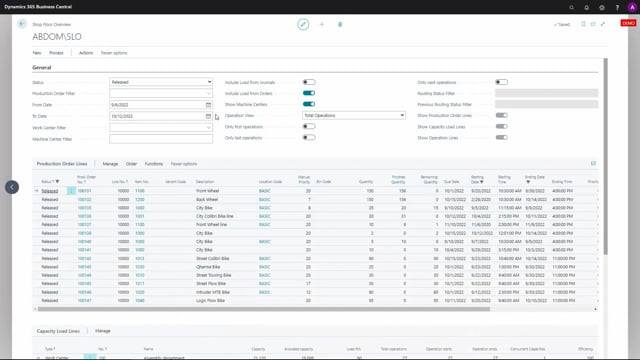


The shop floor overview in Microsoft Dynamics 365 Business Central includes several filters in the header. These filters apply to three different views: the capacity line, the production order line, and the operation line. When you work with the production order line view, only some of those header filters actually affect what you see.
If you want to control what appears in the production order line view, you only need to know about three filters. The rest of the header filters have no effect on this particular view.
Which header filters apply to the production order line view
Only three of the header filters influence the production order line view:
- Status – lets you select either firm planned or released production orders.
- Production order filter – lets you add a specific filter for one or more production orders.
- From date and To date – limits the production order lines to a date range.
The production order line view ignores all the other filters in the header. When you update the production order lines, only these three filters are taken into account.
Why this matters when you work with the shop floor overview
It is easy to assume that every filter in the header applies to whatever view you are looking at. That is not the case here. If you adjust a filter that belongs to the capacity line or operation line and expect it to change the production order lines, nothing will happen. Knowing exactly which filters apply where saves you the confusion of wondering why your filtering does not behave as expected.
Q&A
Which header filters affect the production order line view in the shop floor overview?
Only three filters affect the production order line view: Status, Production order filter, and the From date and To date fields. All other header filters are ignored for this view.
What options does the Status filter give you?
The Status filter lets you select either firm planned or released production orders.
Do the other header filters affect the production order lines?
No. When you update the production order lines, only the Status filter, the Production order filter, and the From date and To date fields are applied. The remaining header filters have no effect on this view.