
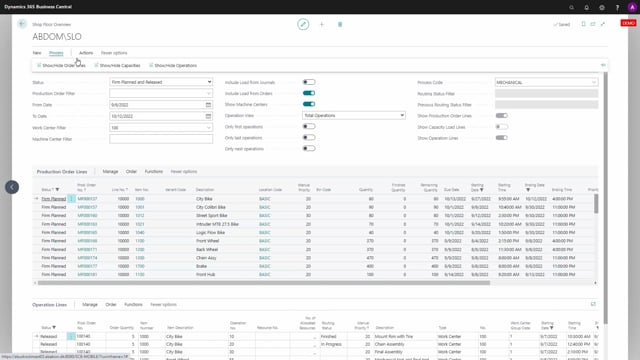


The shop floor mobile app gives Business Central users two main pieces of functionality for handling production work directly from the manufacturing floor. The first is the shop floor overview, which gives you a flexible, filterable screen showing production lines, capacities, and operations. The second is mobile flow shop floor production, an interface for registering everything tied to production orders.
You can run the mobile flow on scanners, screens, tablets, smartphones, and iPhones. It lets you register production time, scan or enter production order and operation numbers, consume materials, and register finished quantities. You can also use start/stop functionality and track your own operations through time collectors.
Two main functionalities in the shop floor mobile app
The whole idea behind the shop floor mobile app is to give the Business Central user two major capabilities. One is the shop floor overview. The other is what we call mobile flow shop floor production. Together they cover how people on the manufacturing floor see what needs doing and how they report on the work they’ve done.
The shop floor overview for production lines and capacities
The shop floor overview is a screen, or a setup, where you can build an interface for the user in the manufacturing area. It shows production lines, capacities, and operation lines, and gives you a clear overview with a lot of flexibility in how you filter the data.
From the overview, a worker can see what’s planned for the manufacturing area and what they need to do on a specific work center. It isn’t just a passive view. You can also make quick registrations directly from it, for example registering times, output, and start/stop times.
Mobile flow shop floor production for registering production orders
The second part of the shop floor mobile is the mobile flow shop floor production. This is an interface where you can easily register everything about production orders. It works across all kinds of devices, including scanners, screens, tablets, smartphones, and iPhones.
The functionality is flow based, which keeps registrations fast. To register runtime, you scan or enter a production order number, scan or enter the operation number you’re working on, and then enter the number of minutes you’ve spent on it. Once that’s done, you can start the next registration right away.
What you can register from the shop floor
Through this setup you can register production time and work with what we call my operations, where you use start/stop functionality and see your time collectors. You can also work with production materials. That means consuming everything that goes into the order and registering the finished quantity on production orders.
Q&A
What are the two main functions of the shop floor mobile app?
The app provides two functions. The first is the shop floor overview, a flexible screen showing production lines, capacities, and operation lines. The second is mobile flow shop floor production, an interface for registering everything tied to production orders.
Which devices can run the shop floor mobile app?
You can use it on scanners, screens, tablets, smartphones, and iPhones.
How do you register production runtime in the mobile flow?
You scan or enter a production order number, scan or enter the operation number you’re working on, and then enter the number of minutes you’ve spent on it. This keeps registrations fast and lets you repeat the process for the next entry.
Can you make registrations directly from the shop floor overview?
Yes. The overview lets you make quick registrations on times, output, and start/stop times, in addition to giving you a filterable view of the manufacturing area.
Can you handle production materials and finished quantities from the app?
Yes. You can consume the materials that go into a production order and register the finished quantity on that order.