
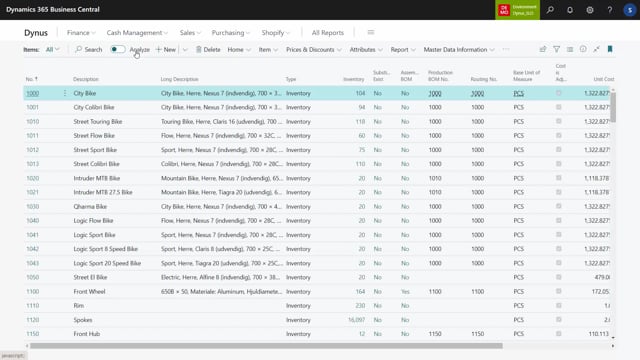


The information matrix in Business Central gives you a fast way to view and edit item data across many records at once. But it behaves differently depending on whether you delete a line or delete a value, and that distinction matters if you want to avoid accidentally changing your actual item data. This article explains how the information matrix updates data in real time, what happens when you delete lines versus values, and how to restore data you have changed.
The information matrix updates your actual item data in real time. When you change a value in the matrix, the same value updates on the item card immediately.
Deleting a line in the matrix does not delete the item. The list of lines is just the selection you are working on, so removing a line only removes it from your current view.
Deleting a value in the matrix does change the data. If you set a unit price to zero, the item card updates to zero. If you clear a material value, Business Central asks whether you want to update the existing information value, and confirming removes it from the item card.
You can always re-enter data, either directly in the information matrix, on the item card, or in the specification.
How the information matrix updates data in real time
The lines in the information matrix work in a temporary way, but the data updates in real time. When you change something in the matrix, you are also changing the actual underlying data.
For example, take item 1000. The unit price shows around 5,000, and if you open the specifications you can see the material is aluminum. These are the real values stored on the item card, surfaced through the matrix.
Deleting lines in the information matrix does not delete items
This is where it gets interesting. If you have imported a set of items into the matrix and then delete those lines, you are not deleting the actual items. The list of items in the matrix is just the selection you are currently working on.
So even if you delete everything in the matrix, the items still exist and no data has changed. If you import the items again, you get the same items back. Deleting lines is simply a way of clearing what you are working on, not a way of removing records from the system.
Deleting values in the information matrix changes the item card
Deleting a value is a different matter. If you take the first line on item 1000 and clear the unit price by entering zero, because it is a decimal field, the item card updates to zero. The price is now gone from the item.
The same applies to other fields. If you find the material and delete the value, Business Central tells you it already found an information value and asks whether you want to update it. If you confirm with yes, the material is removed from the item card.
There is one detail worth noting. When you remove the material this way, you remove the value, but the material line itself stays in place. The field is just left blank. So clearing aluminum from the matrix leaves the material line on the item, it simply has no value anymore. The information value field is emptied rather than the line being deleted.
If you want to remove the information code line entirely, you can do that manually on the item itself. From the information matrix, though, the action only clears the information value.
How to re-enter data you have cleared
Anything you clear can be entered again. You have a few options:
- Enter the value directly in the information matrix.
- Enter the data on the specification.
- Enter it manually on the item card.
For example, you can type the price back into the matrix, and you can add the material the same way. Once you enter the value again in the information matrix, the item card updates to match. This is the core behaviour to keep in mind: the matrix updates your data whenever you change a value in it.
Q&A
Does deleting a line in the information matrix delete the item?
No. Deleting a line only removes it from your current selection in the matrix. The item still exists and its data is unchanged. If you import the items again, the same items reappear.
What happens when I clear a value in the information matrix?
Clearing a value updates the actual item card in real time. If you set a unit price to zero, the item card shows zero. If you clear a material value and confirm the prompt, the material is removed from the item card.
When I clear a material value, is the whole line removed?
No. The information value field is emptied, but the material line stays on the item. To remove the information code line completely, you have to delete it manually on the item itself.
How do I restore data I cleared in the matrix?
You can re-enter the value directly in the information matrix, on the specification, or manually on the item card. Re-entering it in the matrix updates the item card automatically.