
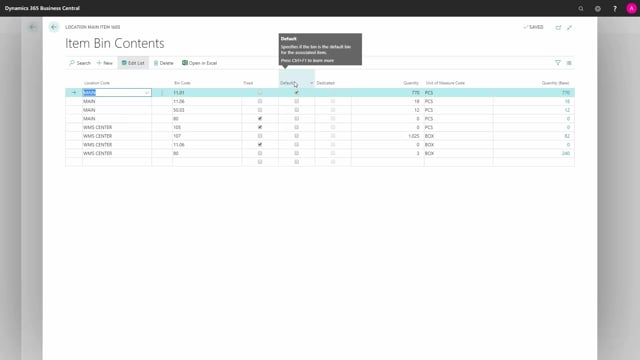


You can set up a default bin on the bin content for an item in Business Central. The default bin is the bin the system suggests automatically when you do a receipt or a shipment.
Default bins only work on locations that are not set up for directed put-away and pick. On WMS locations with the directed put-away and pick checkmark, the system ignores the default bin setting.
You can only have one default bin per combination of item number and location. If you try to set a second default bin for the same combination, the system blocks it.
When you create a pick, the system takes the quantity from the default bin first. If the default bin does not hold enough, the system takes the remaining quantity from another bin.
What the default bin does on the bin content
On the bin content for an item, you can set up a default bin. The default bin is the one the system suggests automatically when you do a receipt or a shipment. It tells the system which bin to prefer for that item at that location.
This only applies to non-directed put-away and pick locations. If you have a main location set up without directed put-away and pick, it respects the default bin checkmark. A WMS location with a checkmark in directed put-away and pick does not use the default bin checkmark.
One default bin per item and location combination
You can only have one default bin per combination of item number and location. If you already have a default bin set on one bin content line and you try to set it on another line for the same item and location, the system stops you. You first have to deselect the existing default bin before you can move it to another bin.
How the system picks from the default bin
Here is a concrete example. On one item, I have a bin code holding a large quantity on stock, plus two smaller bin codes. When I create a pick, the system takes everything from the default bin code.
To show this, I prepared a warehouse shipment for the item. When I create the pick, I expect it to take everything from the one bin set as default. The pick gets created with two pick lines, both coming from the same default bin code.
Next, I delete the pick and change the default bin on the bin content. The new default bin only holds 12 pieces, so I expect the system to take those 12 first and then pull the rest from another bin.
I go back into the same warehouse shipment and create the pick again. This time the shipment needs 25 pieces. The system empties the default bin with the first 12 pieces, then takes the remaining quantity from another bin.
The default bin is the preferred bin used on non-directed put-away and pick locations. It is a simple way to control where the system suggests picking and placing items when you are not running directed put-away and pick.
Q&A
What is a default bin in Business Central?
The default bin is the bin set on the bin content for an item. The system suggests it automatically when you do a receipt or a shipment, and it is the preferred bin the system picks from.
Does the default bin work with directed put-away and pick?
No. The default bin only works on non-directed put-away and pick locations. WMS locations that have the directed put-away and pick checkmark ignore the default bin setting.
Can I set more than one default bin for the same item?
No. You can only have one default bin per combination of item number and location. To move the default bin to another line, you first have to deselect the existing one.
What happens when the default bin does not hold enough quantity?
The system takes as much as it can from the default bin first, then pulls the remaining quantity from another bin. For example, if the default bin holds 12 pieces and you need 25, the system takes the 12 from the default bin and the rest from another bin.