
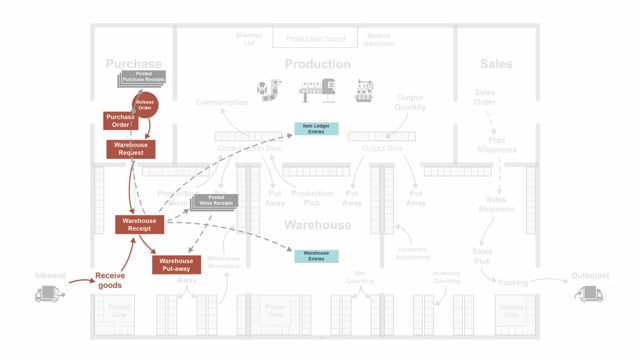


When you release a purchase order in Business Central that points to a warehouse location, the system creates an inbound warehouse request behind the scenes. This request drives the receiving process, but it follows its own lifecycle that is tied to the purchase order, not to the documents you create from it. Understanding how warehouse requests, warehouse receipts, and put-aways relate to each other helps you avoid confusion when documents disappear or can be recreated.
The warehouse request stays alive as long as the purchase order exists. Deleting a warehouse receipt does not delete the warehouse request. You can recreate the receipt again from the purchase order.
The warehouse request is only deleted when the purchase order itself is deleted. This typically happens when you fully receive and invoice the purchase order.
Even after the warehouse request and the purchase order are gone, the warehouse put-away remains, because you still need to move the goods into inventory.
How an inbound warehouse request is created from a purchase order
An inbound warehouse request is created automatically when you release a purchase order, provided the order is on a warehouse location. The act of releasing the order triggers the request.
You cannot see the warehouse request in the user interface. It works as a signal to the warehouse that there are goods to receive. From that signal, you can create a warehouse receipt.
Why the warehouse request survives when you delete a warehouse receipt
If you delete a warehouse receipt, the warehouse request stays in place. The request is independent of the receipt document.
Because the request is still there, you can create the warehouse receipt again directly from the purchase order. The warehouse request is only removed when the purchase order is deleted.
What happens when you post a warehouse receipt
When you post a warehouse receipt, several things happen at once:
- It creates item ledger entries and warehouse entries.
- It creates a posted warehouse receipt.
- It creates the warehouse put-away.
- It creates a posted purchase receipt.
At this stage the warehouse request is still present, because the purchase order still exists. The goods have been received, but the items still need to be put away into their final locations.
When the warehouse request and purchase order are deleted
When you post and invoice the purchase order, the purchase order is deleted. The warehouse request is deleted along with it.
The warehouse put-away is not deleted in this step. It stays because you still need to move the item into inventory. The put-away has its own job to finish, regardless of whether the purchase order and request are gone.
Recreating a warehouse put-away from the put-away worksheet
If you delete a warehouse put-away, you can recreate it from a put-away worksheet. The recreation is based on the posted warehouse receipt, not on the warehouse request.
When you register the warehouse put-away, it creates the warehouse entries that move the goods into inventory. This works even though the warehouse request was already deleted together with the purchase order.
Q&A
When is an inbound warehouse request created in Business Central?
It is created automatically when you release a purchase order that is on a warehouse location. The release of the order triggers the request.
Can you see the warehouse request in the user interface?
No. The warehouse request is not visible in the user interface. It works as an internal signal to the warehouse that goods need to be received.
If you delete a warehouse receipt, is the warehouse request also deleted?
No. The warehouse request stays in place. You can create the warehouse receipt again from the purchase order.
When is the warehouse request deleted?
The warehouse request is only deleted when the purchase order is deleted, which typically happens when you fully receive and invoice the order.
What does posting a warehouse receipt create?
Posting a warehouse receipt creates item ledger entries, warehouse entries, a posted warehouse receipt, the warehouse put-away, and a posted purchase receipt.
Why does the warehouse put-away remain after the purchase order is deleted?
Because you still need to move the received goods into inventory. The put-away has its own task to complete independently of the purchase order and warehouse request.
How do you recreate a deleted warehouse put-away?
You recreate it from a put-away worksheet. The recreation is based on the posted warehouse receipt, so it works even after the warehouse request has been deleted.