
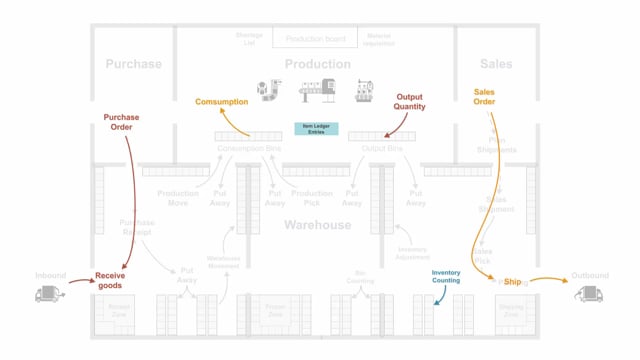


In Business Central, inventory processes are the operations that create item ledger entries. These entries record both the quantity of items in stock and the cost of those items. If you want to understand how inventory works in Business Central, you need to know which processes generate these entries.
You create item ledger entries through purchase orders and sales orders, manufacturing consumption and output, assembly orders, transfer orders, and inventory counting. Each of these reflects a movement of goods, and each updates both quantity and cost in the system.
What item ledger entries are in Business Central
Inventory processes in Business Central are the processes that provide or create item ledger entries. An item ledger entry reflects two things: the cost of the items and the quantity in stock. Whenever goods move in or out, or you adjust your counts, the system records it as an item ledger entry.
Purchase orders and sales orders for inbound and outbound handling
The order documents are the most common starting point. You use the purchase order for inbound handling and the sales order for outbound handling.
With a simple or basic inventory setup, you receive goods directly on the purchase order. That means you enter the quantities directly on the purchase order and post it. The same applies on the sales side. When you want to ship, you enter the quantity directly on the sales line.
Manufacturing consumption and output
In manufacturing, the relevant processes are consumption and output. Consumption is when you use items in production. Output is when you finish items from production. Both create item ledger entries that reflect the movement of materials through your production.
Assembly orders and transfer orders
If you work with assembly orders or transfer orders, these also create item ledger entries. They handle the movement of items as you assemble products or move stock between locations.
Inventory counting
Inventory counting is the process you run regularly to check your actual stock. You count the quantity per item and enter those figures into the system. This adjusts the recorded quantity to match what is physically on hand, and it also creates item ledger entries.
How it all comes together
All of these processes (purchase orders, sales orders, consumption and output, assembly and transfer orders, and inventory counting) create item ledger entries. Together, these entries give you an accurate picture of both the quantity you have in stock and the cost tied up in your inventory.
Q&A
What is an item ledger entry in Business Central?
An item ledger entry is a record created by inventory processes in Business Central. It reflects both the cost of the items and the quantity in stock.
Which processes create item ledger entries in Business Central?
Purchase orders, sales orders, manufacturing consumption and output, assembly orders, transfer orders, and inventory counting all create item ledger entries.
How do you receive goods on a purchase order with a basic inventory setup?
With a simple or basic inventory setup, you enter the quantities directly on the purchase order and post it to receive the goods.
What is the difference between consumption and output in manufacturing?
Consumption is when you use or consume items in production. Output is when you finish items from production. Both create item ledger entries.
What is the purpose of inventory counting?
Inventory counting lets you check the actual quantity of each item regularly and enter those figures into the system, so your recorded stock matches what is physically on hand.