
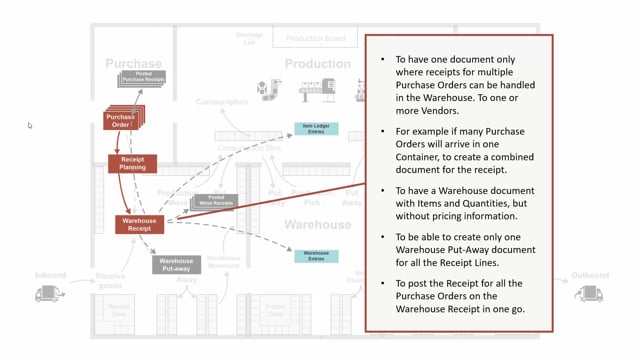


The warehouse receipt in Business Central lets you handle incoming goods from multiple purchase orders in a single document. You activate it by check-marking Require Warehouse Receipt on the location card.
You use the warehouse receipt to consolidate receipts, to give warehouse staff a document without pricing information, to generate put-away documents, and to post receipts across several purchase orders at once.
When you post a warehouse receipt, Business Central creates both item ledger entries and warehouse entries, because the items land in the receipt bin.
How to activate the warehouse receipt in Business Central
The warehouse receipt is created when you have check-marked Require Warehouse Receipt on the location card. Once that setting is in place, incoming goods on that location go through a warehouse receipt before they are posted.
Handling multiple purchase orders in one document
One of the main reasons to use a warehouse receipt is to gather receipts for several purchase orders into a single document. You can have one bundle document that points to many different purchase orders.
A typical scenario is when several purchase orders arrive in the same container. Instead of handling each order separately, you create one document where you can process all the lines in one go. That makes it easier to plan your purchase receipt.
A warehouse document without pricing information
The warehouse receipt shows items and quantities, but not pricing information. That is useful in several situations:
- You don’t want your warehouse staff to see the prices.
- You want to use the document for external warehouses.
- You simply want a simpler document for the people working with it.
Creating put-away documents from the receipt
You can use the warehouse receipt to create a put-away document for all the receipt lines. When a container or bundle of items arrives, you make one warehouse put-away document and put everything into the warehouse in one go.
Posting across multiple purchase orders at once
When you post the warehouse receipt, you can post against multiple purchase orders in one operation. The posting creates both item ledger entries and warehouse entries, because the items are placed in the receipt bin. That means you post everything in one step.
Q&A
How do you enable the warehouse receipt in Business Central?
You enable it by check-marking Require Warehouse Receipt on the location card. After that, incoming goods on that location are handled through a warehouse receipt.
Can one warehouse receipt cover several purchase orders?
Yes. One warehouse receipt can point to many different purchase orders, so you can handle all the lines in a single document. This is useful when several purchase orders arrive in the same container.
Does the warehouse receipt show prices?
No. The warehouse receipt shows items and quantities, but not pricing information. That makes it suitable when you don’t want warehouse staff or external warehouses to see prices.
What happens when you post a warehouse receipt?
Posting creates both item ledger entries and warehouse entries, because the items are placed in the receipt bin. You can post against multiple purchase orders in one operation.
Can you create a put-away from a warehouse receipt?
Yes. You can create a put-away document for all the receipt lines, so a container or bundle of items can be put into the warehouse in one go.