
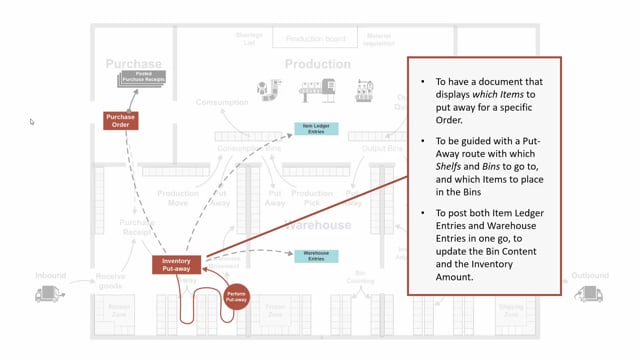


The inventory put-away document in Business Central lets you handle the physical put-away process directly from a purchase order. You use it on locations where you have enabled Require Put-away (and optionally Require Bin), but not Require Receipt. When you post the document, Business Central creates the posted purchase receipt, the posted inventory put-away, item ledger entries, and warehouse entries in one step.
The document guides your warehouse staff to the right bins and shelves and shows which items to place where. It works as the suggestion for where to store the goods you have received.
What the inventory put-away document is and when it applies
The inventory put-away document relates to locations where you have check-marked the Require Put-away field, and possibly the Require Bin field, but where the Require Receipt field is not enabled. This combination of settings is what determines whether you work with an inventory put-away rather than a full warehouse receipt and put-away flow.
Because Require Receipt is turned off, the document is made directly from the purchase order. You do not need a separate warehouse receipt step first.
What the inventory put-away document does
The purpose of the document is to show which item to put away for a specific purchase order, and to guide the warehouse worker through the put-away. It provides a route with the shelves and bins to go to and the items to place in each bin.
In practical terms, the document is the system’s suggestion for where to store the goods you have just received in your inventory.
What happens when you post the document
When you post the inventory put-away document, Business Central handles both the inventory and warehouse side of the transaction at the same time. It registers the put-away and posts directly on the purchase order.
The result is created in one go:
- A posted purchase receipt
- A posted inventory put-away
- Item ledger entries
- Warehouse entries
This means you avoid splitting the process across several manual steps. The receipt against the purchase order and the warehouse put-away are completed together.
Q&A
When do you use the inventory put-away document in Business Central?
You use it on locations where Require Put-away is enabled (and optionally Require Bin), but Require Receipt is not. In that setup the document is created directly from the purchase order.
What does the inventory put-away document create when you post it?
Posting creates a posted purchase receipt, a posted inventory put-away, item ledger entries, and warehouse entries in one operation, and posts directly on the purchase order.
What is the difference compared to a location that requires a receipt?
When Require Receipt is enabled, you handle the receiving step separately. With the inventory put-away document, Require Receipt is off, so the document is made directly from the purchase order and combines receipt and put-away.
What does the inventory put-away document guide you to do?
It shows which items to put away for a specific purchase order and provides a put-away route with the shelves and bins to go to and the items to place in each bin.