


When you work with warehouse receipts and put-aways in Business Central, the documents you handle behave differently from the underlying purchase order. This is something that surprises many users the first time they post a warehouse receipt and watch it disappear.
When you post a warehouse receipt, the receipt itself is deleted, the purchase order is registered as received, and Business Central automatically creates a warehouse put-away document. The put-away stays open until you actually post it, even if you invoice and delete the purchase order in the meantime.
If you accidentally delete a put-away document before moving the goods from the receiving bin, you can recreate it using the put-away worksheet. The link between received goods and the put-away is not lost when the put-away document is deleted.
How posting a warehouse receipt affects the purchase order
The flow starts with a purchase order. Before you can create a warehouse receipt, you have to release the purchase order. If you try to create the receipt while the order is still open, you get an error. So always remember to release the purchase order first.
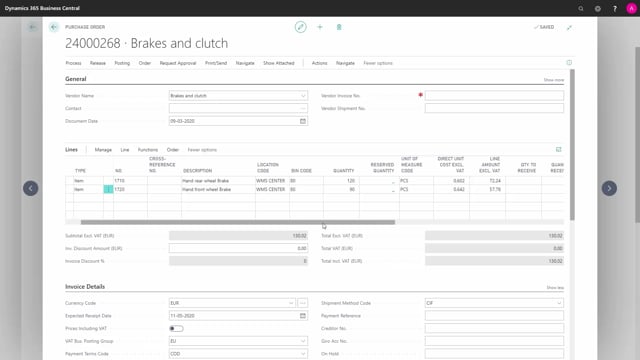
Once the order is released, you create a warehouse receipt. The receipt opens, and you can enter the quantity you want to receive. When you post it, the item is received into the receiving bin (in this example, bin code 80), and the purchase order is updated to show the received quantity.
At the moment you post, the warehouse receipt itself is deleted. The purchase document is now marked as received. So the receipt is a temporary document that does its job and then disappears.
The put-away document survives even after the purchase order is invoiced
This is where it gets interesting. Even if you invoice the purchase order, the put-away still exists. When you invoice the order to the vendor, the purchase order itself disappears. In this example, purchase order 268 is deleted once it has been fully invoiced.
But the warehouse put-away is not tied to the existence of the purchase order. If you open your warehouse put-aways after the purchase order is gone, the put-away document is still there, linked to the posted purchase receipt instead.
So even though all the other inbound warehouse documents have been posted and deleted, the put-away document remains open until you handle it. It keeps the goods accounted for in the receiving bin until you physically move them and post the put-away.
How to recreate a deleted put-away with the put-away worksheet
If you happen to delete a put-away document before moving the goods from the receiving bin into their final bins, you are not stuck. You can recreate it using the put-away worksheet.
Open the put-away worksheet and run Get Warehouse Documents. This shows you the documents that have been received but not yet handled from the receiving bin. From there, you select the lines and create a new put-away based on them.
The new put-away activity then appears again, ready for processing. The put-away will keep showing up until you actually post it. Deleting it does not make the work disappear, because the goods are still sitting in the receiving bin and need to be put away somewhere.
What this means in practice
The key takeaway is that the warehouse receipt and the put-away serve different purposes and have different lifespans. The receipt is short-lived and vanishes when posted. The put-away is the document that tracks the physical movement of goods, and it stays open until the goods have actually been placed in their bins.
Because the put-away is linked to the posted purchase receipt and not the purchase order, you can safely invoice and close out the purchase order without losing track of goods that still need to be put away.
Q&A
Why do I get an error when creating a warehouse receipt?
The purchase order has to be released before you can create a warehouse receipt. If the order is still open, Business Central gives you an error. Release the purchase order first.
What happens to the warehouse receipt when I post it?
The warehouse receipt is deleted when you post it. The purchase order is updated as received, and Business Central creates a warehouse put-away document automatically.
Does the put-away document disappear when I invoice the purchase order?
No. The put-away stays open even after you invoice and delete the purchase order. It is linked to the posted purchase receipt, not the purchase order, and remains until you post it.
Can I recreate a put-away document I deleted by mistake?
Yes, as long as you have not moved the goods out of the receiving bin. Open the put-away worksheet, run Get Warehouse Documents, select the lines for the received goods, and create a new put-away.
How long does the put-away document stay open?
It stays open until you post the put-away. Deleting it does not close the task, because the goods are still in the receiving bin and need to be moved to their final bins.