


Business Central lets you control your outbound warehouse processes through the location card. By combining settings for shipments, picks, and bins, you decide how much complexity each location needs. This article walks through four concrete setup examples, from a simple location with no warehouse documents to a fully directed put-away and pick warehouse.
If you only want to post directly on the sales order, set just Bin Mandatory and skip shipments and picks. If you want to bundle several sales orders into one shipment, enable Require Shipment. If you want picks but no shipment bundling, use inventory picks created directly from the sales order. For a full warehouse with directed put-away and pick, the Pick checkmark forces all the related settings on automatically.
How the location card controls your outbound process
The location card is where you define how goods move out of a location. You can mix and match sales orders, shipments, picks, and the use of bins to match the way each warehouse actually works. A small location with simple handling needs very few settings, while a large warehouse with directed put-away and pick needs the full set.
Below are four setups that cover the most common scenarios.
Setup 1: External warehouse with shipments but no bins or picks
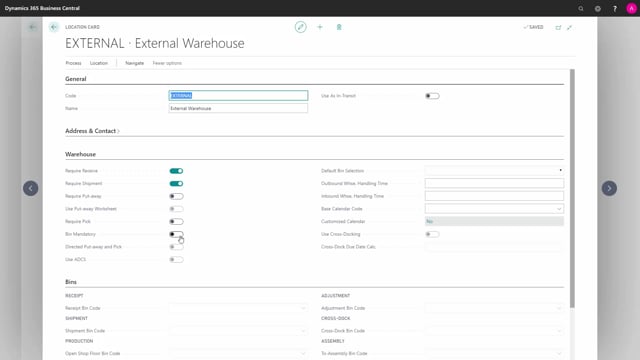
The first example is what you might call an external warehouse. Here it makes sense to take several sales orders and combine them into one shipment that you send to an internal warehouse. It could also be that you want one warehouse document internally without pricing coming from the sales order, but without using bins and therefore also without using picks.
On the location card, this is a location called External, set up with Require Receive and, on the outbound side, Require Shipment. There are no requirements for bins or picks.
Setup 2: Distribute location with picks and bins but no shipments
The next scenario is what you can call a Distribute location. This location has no shipments, but it requires put-away and bins.
On the outbound side, you have no sales shipment to bundle the sales order. Instead, you create picks directly from the sales order. In Business Central, these are called inventory picks. You also use the bin functionality in this setup.
Setup 3: Simple location with bins only
The third example uses bins only. This is a location called Bin Simple, where the only checkmark set is Bin Mandatory. With this setup, you do all postings directly on the documents, while still keeping track of bins.
Setup 4: Main warehouse with directed put-away and pick
The last example is the most advanced. You can either use directed put-away and pick, where the Pick checkmark automatically forces all the other checkmarks to be set, or you can configure a main location where you manually set all the checkmarks for shipments, put-aways, and Bin Mandatory.
In this scenario, you get all the warehouse activities: pick activities, sales shipment activities, and movement activities between bins.
Choosing the right setup for your location
The right combination depends on how the location works in practice. A location that simply posts on documents needs only Bin Mandatory. A location that consolidates orders into shipments needs Require Shipment. A location that picks goods but does not bundle shipments uses inventory picks with bins. And a full warehouse uses directed put-away and pick to handle the complete flow.
Q&A
How do I set up a location that posts directly on documents without picks or shipments?
Create the location and set only the Bin Mandatory checkmark. This lets you do all postings directly on the documents while still using bins. In the example, this setup is called Bin Simple.
How do I combine several sales orders into one shipment?
Set up the location with Require Shipment on the outbound side. This lets you bundle several sales orders into one shipment, for example to send to an internal warehouse. You do not need bins or picks for this setup.
What is the difference between an inventory pick and a warehouse pick in Business Central?
An inventory pick is created directly from the sales order without a sales shipment to bundle orders. You use this on a location that requires picks and bins but has no shipments. A full warehouse pick is part of the directed put-away and pick setup, which includes shipment activities as well.
What happens when I enable the Pick checkmark on a location?
The Pick checkmark for directed put-away and pick automatically forces all the other checkmarks to be set. This gives you the full set of warehouse activities, including pick activities, sales shipment activities, and movement between bins.
Can I set up a location with put-away and bins but no shipments?
Yes. This is the Distribute scenario. You require put-away and bins, but you have no shipments. You create picks directly from the sales order as inventory picks while still using the bin functionality.