


When you work with inventory and warehouse functionality in Business Central, the system creates several types of entries behind the scenes. Understanding how item ledger entries, warehouse entries, and bin content relate to each other is essential when you need to track where your items are and what they cost.
Item ledger entries always store quantities in the base unit of measure, and they hold prices, sales, and cost values. Warehouse entries and bin content only store quantities, unit of measure codes, and bin codes. They contain no prices.
Item ledger entries can be modified again and again, for example when the remaining quantity changes after a sale. Warehouse entries are never maintained after they are created. The bin content is a sum-up of the warehouse entries and shows how much you have in each unit of measure on a given bin.
One purchase of 50 pieces creates a single item ledger entry, but the same flow can create many warehouse entries because every movement in the warehouse generates its own entry.
The three types of inventory entries in Business Central
When you work with inventory and warehouse in Business Central, you create two interesting kinds of entries: item ledger entries and warehouse entries. On top of that you have the bin content table, which is a kind of summary built on the warehouse entries.
The item ledger entry applies to documents and to inbound and outbound handlings in the company. The warehouse entry relates to things that happen inside the warehouse. The correlation between the two is important to understand.
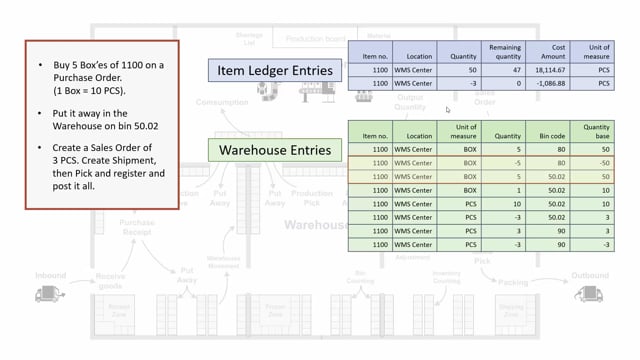
If you take item 1100 and drill into the item ledger entries, you might see that you have bought 50 pieces and sold three pieces. That is just two item ledger entries. When you look at the warehouse entries for the same item, you see quite many entries, each with its own quantity and unit of measure. So for only two item ledger entries, you can have many warehouse entries.
The bin content rounds it off. If you filter the bin content on the location you are looking at, you might see four bin contents, each reflecting a quantity and a unit of measure.
What the item ledger entry stores
The item ledger entry holds the unit of measure code, but it also holds prices, both sales and cost prices. Quantities on the item ledger entry are always in the base unit of measure.
Take a concrete scenario. You buy five boxes of an item where one box equals 10 pieces, set up on the item card, and you buy it on a purchase order. This creates one item ledger entry of 50 pieces that you add to inventory. Originally the remaining quantity is 50 pieces.
Putting the item away in the warehouse on a bin does nothing to the item ledger entries. When you then create a sales order, ship and pick it, and register and post everything, you create one item ledger entry of -3 pieces. The remaining quantity is maintained on the original item ledger entry. That is why an item ledger entry can be modified again and again.
What the warehouse entry stores
The warehouse entries reflect everything that happens in the warehouse. Once an entry is created, it is not maintained afterwards. It contains no prices, only quantities, unit of measure codes, and bin codes. The point of the warehouse entry is to tell you where the item is in inventory and on which bins.
Follow the same scenario through the warehouse. First you buy 50 pieces, which is five boxes, on the purchase order, and it comes into bin code 80, the receive bin. In the warehouse entry, this uses the unit of measure code with five boxes, while the item ledger entry shows 50 pieces.
When you make a put-away, you take out the five boxes again and add them to bin code 50.02, still in boxes.
The next thing is the sales order pick. When you create the pick, it automatically suggests four lines in this scenario, because it needs to break up one box on bin code 50.02 and put it back on the same bin code in pieces. It makes a suggestion for a break because you need to pick three pieces. After the break, the pick takes three pieces from the bin code and adds them to the shipping bin. Finally you sell the three pieces to the customer, which takes out three. That is the full warehouse entry flow.
How bin content sums up the warehouse entries
If you look at the bin content for this scenario, it is a sum-up of the warehouse entries. When you open the bin content from the item card, it displays how many quantities you have, and in which unit of measure, on your inventory.
In this scenario you end up with four boxes and seven pieces. That number comes directly from adding up the warehouse entry movements across the bins.
Q&A
What is the difference between item ledger entries and warehouse entries in Business Central?
Item ledger entries apply to documents and to inbound and outbound handlings, and they hold prices and quantities in the base unit of measure. Warehouse entries reflect movements inside the warehouse and hold only quantities, unit of measure codes, and bin codes, with no prices.
Why do I have more warehouse entries than item ledger entries for the same item?
Every movement in the warehouse, such as receiving, put-away, picking, breaking units of measure, and shipping, creates its own warehouse entry. A single purchase or sale that creates one item ledger entry can therefore generate many warehouse entries.
Can item ledger entries and warehouse entries be changed after they are created?
Item ledger entries can be modified again and again, for example when the remaining quantity changes after a sale. Warehouse entries are never maintained after they are created.
What does the bin content show?
The bin content is a sum-up of the warehouse entries. It shows how many quantities you have, and in which unit of measure, on each bin in your inventory.
In which unit of measure are item ledger entry quantities stored?
Item ledger entry quantities are always stored in the base unit of measure, even if the purchase or sale was made in boxes or another unit. The warehouse entries keep the actual unit of measure used in each movement.