
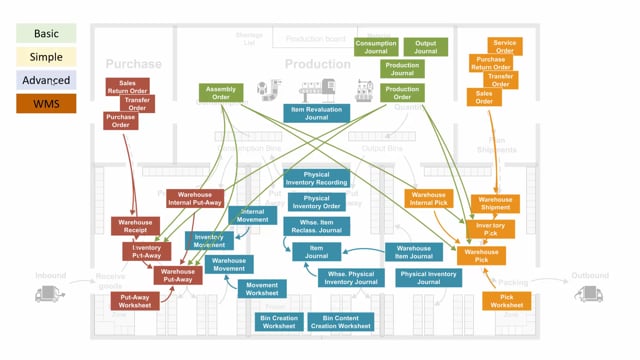


When you move materials to a production order in Business Central, you need to decide how and when consumption gets posted. The choice comes down to whether you post consumption at the moment you pick from inventory, or whether you only move the items to the production area and let the production team post the actual consumption later using a production journal.
If you use an inventory pick, you post consumption when you post the pick. If you use an inventory movement instead, you only move the items into a bin near the production area, and consumption is posted separately.
Choose an inventory movement when you want to post consumption from a production journal rather than from the pick, or when you need to move more than the production order requires, such as a full pallet.
The same principle applies across all location types: simple, advanced, and warehouse management locations with directed put-away and pick. The directed put-away and pick setup is the most complex because you have to change the consumption bin in the consumption journal so you consume from the bin near the production order.
Two ways to move materials to a production order on a simple location
On a simple warehouse location, you have two options for getting items into the production area. You can create an inventory pick, or you can create an inventory movement.
The difference matters for your consumption posting:
- Inventory pick: When you post the pick, you also post consumption at the same time.
- Inventory movement: You move the item into a bin near the production area. Consumption is not posted here. You post it separately.
When to use an inventory movement instead of an inventory pick
There are two common reasons to choose an inventory movement over an inventory pick.
First, you may not want to post consumption when you pick. Instead, you want to use an actual production journal to post the consumption. In that case, you create a move so the consumption stays separate from the warehouse handling.
Second, in real life you often need to move more than what the production order calls for. You might want to bring a full pallet into the production area rather than just the exact quantity on the order. Here you can create movements more manually to bring the materials closer to the production order. The production people then post the actual consumption from those bins, and you can move any remainder back again afterwards.
Define your consumption posting strategy
The decision you need to make is a strategy choice, not a one-off. You have to decide whether you post consumption when you pick from inventory, or whether you post consumption when the items are actually consumed on the production order.
Settle this before you set up your process, because it determines which warehouse documents you use and when your inventory and cost figures reflect the consumption.
How the strategy works across location types
This approach is not limited to simple locations. It applies across the different warehouse setups in Business Central:
- Simple location: Use an inventory pick or an inventory movement.
- Advanced location: Use a warehouse pick, or internal movements and inventory movements.
- Warehouse management locations with directed put-away and pick: Use the warehouse pick functionality, the movement worksheet, or a warehouse movement.
Directed put-away and pick requires extra care with the consumption bin
On a location set up with directed put-away and pick, this is a little more complex. You need to consume from a bin near the production order, which means you have to change the bin for the actual consumption when you work in the consumption journal. Plan for this step so your consumption is posted from the correct bin.
Q&A
What is the difference between an inventory pick and an inventory movement for production?
An inventory pick posts consumption when you post the pick. An inventory movement only moves the items into a bin near the production area, and consumption is posted separately, typically from a production journal.
When should I use an inventory movement instead of an inventory pick?
Use an inventory movement when you want to post consumption from a production journal rather than from the pick, or when you need to move more than the production order requires, such as a full pallet.
Does this consumption strategy work on all location types in Business Central?
Yes. On simple locations you use an inventory pick or inventory movement. On advanced locations you use a warehouse pick or internal and inventory movements. On warehouse management locations with directed put-away and pick you use the warehouse pick functionality, the movement worksheet, or a warehouse movement.
Why is directed put-away and pick more complex for production consumption?
Because you need to consume from a bin near the production order, you have to change the bin for the actual consumption in the consumption journal so the items are consumed from the correct bin.