


If you work with warehouse processes in Microsoft Dynamics 365 Business Central, you need to understand the difference between an inventory pick and a warehouse pick. The two documents look similar but behave very differently.
An inventory pick has a one-to-one relation to a single source document. You can create it directly from a sales order or manually. When you post an inventory pick, you create both warehouse entries and item ledger entries at the same time, which also produces a posted sales shipment.
A warehouse pick can handle several source documents at once and is always tied to a warehouse shipment. You cannot create it manually. When you register a warehouse pick, you only create warehouse entries and move items from one bin to the shipment bin. No item ledger entries are posted at that point.
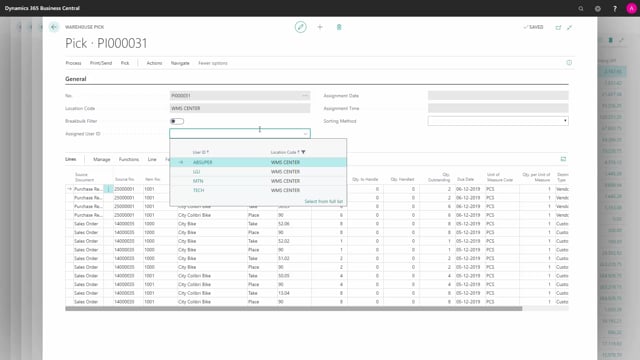
A warehouse pick gives you more functionality. You get a take line and a place line per item, support for breakbulk between different units of measure, and the option to assign a warehouse employee to the pick.
What an inventory pick is and how it works
An inventory pick can be created directly from a sales order, or you can create it manually and then import the source document into it. There is a strict one-to-one relation between an inventory pick and the source document. If you try to get two source documents into the same inventory pick, it will not allow it. It only keeps one of them, automatically selecting and importing the second one in place of the first.
On the inventory pick, you have only one line per item that you need to pick. In a simple scenario, that means one pick line. The line displays the bin code, which tells you where to take the item from.
When you post the inventory pick, the action is called posting for a reason. You post both warehouse entries and item ledger entries in one step. The posting creates a warehouse entry out of the bin code and thereby reduces the warehouse, and it also creates a posted sales shipment.
You cannot assign a user ID on the inventory pick header. There is no way to distinguish who should perform the pick.
What a warehouse pick is and how it differs
The warehouse pick header has fewer fields than the inventory pick. That is because you cannot create a warehouse pick manually. There is no new function on the document. A warehouse pick is always created in relation to a warehouse shipment, either directly from the warehouse shipment or from a pick worksheet.
This makes the warehouse pick a more locked document. In return, it is more flexible on the source side. You can have many different source documents on the same warehouse pick. One or more warehouse shipments can go into a single warehouse pick. In a typical scenario, you can have both purchase return orders and a sales order on the same pick, and you could have several of each.
On the warehouse pick, you get two lines per item you need to pick: a take line with the action type Take, and a place line with the action type Place. You go and find the item in your inventory on one bin code, and the system automatically suggests placing it on the shipment bin code.
Why a warehouse pick is registered and not posted
When you process a warehouse pick, you register it rather than post it. Registering only creates warehouse entries. It moves the item from your pick bin into the shipment bin. No item ledger entry is created at that stage, which is why the action is called register and not posting.
This separation matters. The warehouse pick handles the physical movement inside the warehouse, while the item ledger and the financial side are handled later when the warehouse shipment is posted.
Extra functionality in the warehouse pick
The warehouse pick supports breakbulk handling, so you can work with different units of measure on the same pick. You can also assign a warehouse employee to the warehouse pick, which lets you distinguish who should perform the pick.
The warehouse pick gives you more functionality overall, but it comes with the constraint that it is always locked to a warehouse shipment.
Q&A
What is the difference between an inventory pick and a warehouse pick in Business Central?
An inventory pick has a one-to-one relation to a single source document and posts both warehouse entries and item ledger entries in one step, creating a posted sales shipment. A warehouse pick is always tied to a warehouse shipment, can handle multiple source documents, and is only registered, creating warehouse entries that move items between bins without an item ledger entry.
Can you create a warehouse pick manually?
No. A warehouse pick cannot be created manually. It is always created in relation to a warehouse shipment, either directly from the warehouse shipment or from a pick worksheet.
Why is a warehouse pick registered instead of posted?
Registering a warehouse pick only creates warehouse entries and moves the item from the pick bin to the shipment bin. No item ledger entry is created at that point, so the action is called register rather than posting.
How many lines per item appear on each pick type?
An inventory pick has one line per item, showing the bin code to take from. A warehouse pick has two lines per item: a take line and a place line that suggests the shipment bin code.
Can you assign a user to a pick?
You can assign a warehouse employee to a warehouse pick so you can distinguish who performs the pick. You cannot assign a user ID on the inventory pick header.
Can a single pick cover multiple source documents?
An inventory pick has a strict one-to-one relation to one source document. A warehouse pick can include many different source documents, such as several warehouse shipments covering both purchase return orders and sales orders.