
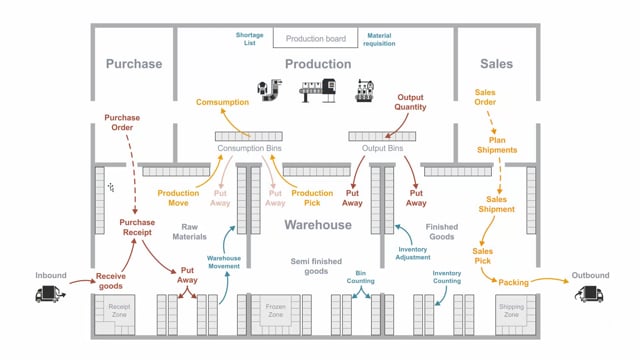


In Microsoft Dynamics 365 Business Central, the outbound warehouse process moves goods from your sales order to the customer through a series of steps. You start with a sales order, create a sales shipment, generate a pick, register the pick, and post the sales shipment.
A sales shipment can combine several sales orders into one document, whether to different customers or multiple orders to the same customer. You can create one pick from one shipment, or one pick from several shipments.
Shipping documents come from more than just sales orders. Purchase return orders and transfer orders also create shipping documents, because they all represent goods you want to ship out of the warehouse.
When you register the sales pick, Business Central creates warehouse entries that move the item from its specific bins into a bin in the shipping zone. When you post the sales shipment, the system posts both the item ledger entry and the sales order.
Outbound warehouse activities in Business Central
When you look at all the activities in the warehouse, the outbound side covers everything you ship out of the house. The process starts with a sales order. From the sales order, you create a sales shipment.
A sales shipment is a document that can hold many different sales orders. That means you can combine orders to different customers, or you can combine several orders to the same customer into one document. From one shipment, you create one pick. You can also create one pick from several sales shipments.
Shipping documents from sales, returns, and transfers
A sales shipment does not only come from a sales order. You can also have a purchase return order or a transfer order feed into it. All of these create shipping documents. A shipping document simply represents goods you want to ship out of the warehouse.
Picking and the shipping zone
After you create the pick, you walk around the inventory, pick the actual item, and put it into the shipping zone.
When you register the sales pick, the system creates warehouse entries. The pick is essentially a moving activity. It takes the item from the different specific warehouse bins and puts it into the bin in the shipping zone. So the pick moves goods from many bins into one bin in the shipping zone.
Packing and posting the sales shipment
When you are ready to send the goods to the customer, you pack and wrap them, and then you post the sales shipment. While you post the sales shipment, the system posts the item ledger entry and posts the sales order as well.
Q&A
Can a sales shipment include orders to more than one customer?
Yes. A sales shipment is a document that can hold many different sales orders. You can combine orders to different customers, or you can combine several orders to the same customer into one shipment.
Which documents create shipping documents in the warehouse?
Sales orders, purchase return orders, and transfer orders all create shipping documents. A shipping document represents goods you want to ship out of the warehouse.
What does registering a sales pick do in Business Central?
Registering the sales pick creates warehouse entries. The pick is a moving activity that takes the item from its specific warehouse bins and moves it into a bin in the shipping zone.
What happens when you post a sales shipment?
When you post the sales shipment, the system posts the item ledger entry and posts the sales order.
Can you create one pick from several sales shipments?
Yes. You can create one pick from a single shipment, or you can create one pick from several sales shipments.