
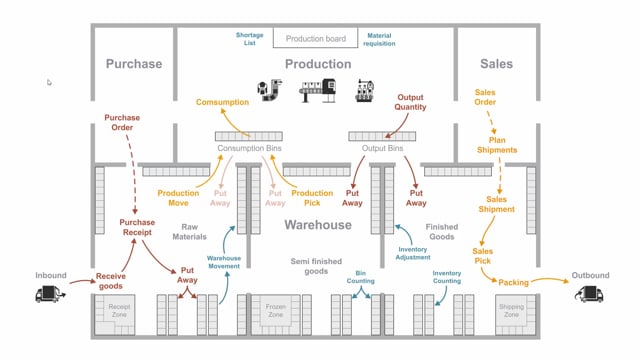


If you use assembly orders or production orders together with warehouse functionality in Business Central, you need to handle pick and put-away activities for your production documents. This article walks through the full flow: how items move from the warehouse into production, how production consumes them, how leftover materials go back to inventory, and how finished goods are put away again.
A production pick (or assembly pick) takes items from the warehouse, finds them on a picking route, and places them in the consumption bins in production. The pick allocates specific items to a specific production or assembly order.
A movement is not a pick. It simply moves items into the consumption bin without reserving them for a specific document. Use a movement when you repeatedly haul the same items in and out of inventory.
Both picks and movements create warehouse entries that move items from one bin to another. Consumption posts item ledger entries. Output posts item ledger entries and makes the finished quantity available on the item card and on stock. After output, the warehouse must perform a put-away to move the finished item into a warehouse bin.
Picks and movements bring items into the consumption bin
From a warehouse perspective, the first step is to get raw materials into production. You create a production pick or an assembly pick to take the item in the warehouse, follow a picking route to find it, and then place it in the consumption bins in the production environment.
A pick activity is where you take specific items, make a movement, and allocate those items to a specific production order or assembly order. The key word is allocate. In a pick scenario, the item in the consumption bin is expected for a specific document.
From a production or assembly order, you can also create a movement activity instead. A movement is not a pick. It just moves items into the consumption bin, and the items are not tied to a specific document. They are simply available in the consumption bin.
The practical difference comes down to how you work. If you repeatedly haul items from inventory into production again and again, a movement document is often the better fit. If you need the items reserved for a specific order, use a pick.
Both activities create warehouse entries that move items from one bin to another. After posting, the item is no longer in the warehouse area but in the consumption bin area in production.
Consuming items in production and assembly
Once the materials sit in the consumption bin, the production people consume them for the production order or assembly order. They consume the item when they actually use it, and this can happen several times for the same order. Each consumption posting creates an item ledger entry with the consumed quantity.
Returning leftover materials to inventory
After consuming items to production, you sometimes have leftovers. This happens when the warehouse moved a full pallet into the consumption bin because it was easier to handle, and the production order did not use all of it. The consumption bin is not empty when the work is done.
You have two ways to get the surplus back into inventory:
- Create a put-away document that tells the warehouse people to put the item back in inventory.
- Let the warehouse people make a manual ad-hoc movement of the items back into the warehouse.
When you post the put-away or the movement, the system creates new warehouse entries that keep the warehouse quantities correct in the right bins.
Output and put-away of finished goods
The next step is for the production people to output the finished quantity. They typically place it in a production bin or an output bin to signal to the warehouse that the goods are ready to go back into stock.
When the output is posted, it creates item ledger entries, and the finished quantity becomes available on the item card and on stock.
The warehouse people then perform a put-away to move the new item into inventory. Whether it is a semi-finished product or a finished product, they put it into specific bins in the warehouse. This put-away creates warehouse entries as well.
Together, these steps cover the full warehouse flow for production and assembly when you use warehouse management functionality: pick or move materials in, consume them, return any leftovers, output the finished goods, and put them away.
Q&A
What is the difference between a production pick and a movement?
A production pick allocates specific items to a specific production or assembly order, so the items in the consumption bin are expected for that document. A movement just places items in the consumption bin without tying them to a document. Use a movement when you repeatedly haul the same items in and out of inventory.
How do I get leftover materials in the consumption bin back into inventory?
You can either create a put-away document that instructs the warehouse to return the item to inventory, or the warehouse can make a manual ad-hoc movement of the items back into the warehouse. Both options create warehouse entries that keep the bin quantities correct.
What happens when I post output in production?
Posting output creates item ledger entries and makes the finished quantity available on the item card and on stock. The warehouse then performs a put-away to move the finished or semi-finished item into specific warehouse bins, which creates additional warehouse entries.
Do picks, movements and put-aways all create warehouse entries?
Yes. Picks and movements create warehouse entries when items move from the warehouse into the consumption bin. Returning leftovers and putting away finished goods also create warehouse entries, keeping the warehouse quantities accurate in the correct bins.
Can I consume items multiple times for the same production order?
Yes. The production people consume items when they actually use them, and this can happen several times for the same order. Each consumption posting creates an item ledger entry with the consumed quantity.