
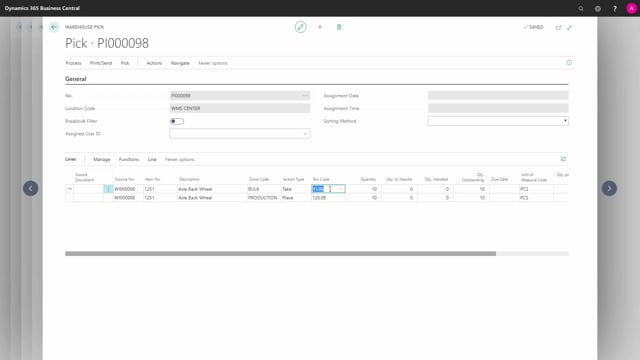


If you work in a full Warehouse Management System (WMS) setup in Business Central, you can use an internal pick document to move components into your production area instead of creating a warehouse movement. This is useful when you want to pick more than the quantity required on a production order’s component lines.
The internal pick document creates a warehouse pick document that suggests where to take the items from. When you post the warehouse pick, it only posts warehouse entries and is not tied to a specific source document. In practice, it works as a movement of items into your production area.
The main advantage over a manual warehouse movement is that the internal pick document gives you intelligent suggestions for which bin to pick from, including when an item sits in several bins across the warehouse, and it supports break-bulk functionality.
When to use an internal pick document in WMS
The setup matters here. You can only use the internal pick document if you work on a location that has a checkmark in Directed Put-away and Pick on the location card. That is the full WMS configuration.
With that in place, you can create an internal pick document and use it to pick components for a production order. Technically you are not picking against the production order itself, you are creating a movement of items into the production area.
This becomes relevant when you want to pick more than the production order needs. If you create a standard warehouse pick from the production order, it only handles the quantities that are actually required. To bring more into production, you have two options: a warehouse movement, or the internal pick document.
Why the internal pick document beats a manual warehouse movement
The internal pick document is easier to work with than a warehouse movement, and it does more of the thinking for you.
When you create the document manually, you already know where the items are going. You are going to place them in the production area near your production bin. You know which item you need and in which quantity. So you simply enter the item number and the quantities down through the lines.
If you are picking many items, you only need to state your to-bin code once across all the lines. Then you create the pick, and Business Central generates a warehouse pick document for you.
What the warehouse pick document does for you
The warehouse pick document fills in the bin code telling you where to take the item, and it splits across different quantities for you.
If the item is placed in several bins around the warehouse, the suggestions become more intelligent. You can also use break-bulk functionality and similar tools.
When you post the warehouse pick, it only posts warehouse entries. It is not fixed to a specific source document. The end result is that you have moved the items into your production area, ready to be consumed.
Q&A
What is the requirement for using an internal pick document?
The location must have a checkmark in Directed Put-away and Pick on the location card, which is the full WMS configuration.
Why would I use an internal pick document instead of a warehouse pick from a production order?
A warehouse pick created from a production order only handles the quantities actually required by the component lines. If you want to pick more components into the production area, the internal pick document lets you do that without being tied to the order quantity.
What happens when I post the warehouse pick created from an internal pick document?
It only posts warehouse entries and is not fixed to a specific source document. It works as a movement of items into your production area.
What advantages does the internal pick document have over a warehouse movement?
It is easier to create, and it suggests which bin to pick the item from. If an item is stored in several bins, you get more intelligent suggestions, and you can use break-bulk functionality.