
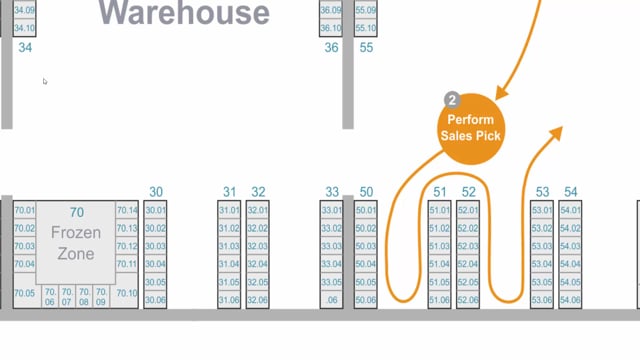


Bin ranking in Microsoft Dynamics 365 Business Central lets you control which bin the system picks from when an item is stored in several bins. You set a higher ranking on the bins you want the system to prefer, so picks happen from the most convenient bin first. Bin ranking only works on locations that have directed put-away and pick enabled.
You typically give the highest ranking to the bin closest to the shipping area, so the system picks from there and uses replenishment to refill it from bins further away.
Bin ranking is different from bin code. Bin code controls the sequence in which you walk the warehouse and perform a pick in a logical order. Bin ranking controls which bin is chosen when an item exists in more than one location.
Bin ranking applies across your entire warehouse, so plan it strategically and account for production areas, bulk areas, and other zones with different needs.
How bin ranking works in Business Central
The bin ranking functionality applies to locations that have the checkmark set in directed put-away and pick. On these locations, the system can use bin ranking to decide which bin to pick from when the same item is stored in several bins.
You assign a ranking to each bin. The bin with the higher ranking is the one the system prefers when it generates a pick. This gives you control over the physical flow of goods in the warehouse rather than leaving it to chance.
Bin ranking versus bin code
It is easy to mix these two up, but they do different jobs.
- Bin code determines the order in which you perform the pick, so you walk the warehouse in a logical sequence when you work the pick.
- Bin ranking determines which bin to choose if an item is available in several bins.
A practical example: pick from the bin nearest the shipping area
A common setup is to give the bin closest to the shipping area a higher ranking than the bin furthest away. The system then picks from the bin nearest the shipping area, and you use replenishment to move stock from the bins further away into that preferred bin.
This keeps your picking efficient. You pick from the bin nearest the door, not the one farthest away, and the replenishment process handles the refilling behind the scenes.
Plan bin ranking for the whole warehouse
Bin ranking applies to your entire warehouse, not just a single area. Think strategically about how you set it up. Consider how production areas, bulk areas, and other zones should be ranked, because the settings affect picking everywhere across the location.
Q&A
What does bin ranking do in Business Central?
Bin ranking decides which bin the system picks from when an item is stored in several bins. You assign a higher ranking to the bins you want the system to prefer.
What is the difference between bin ranking and bin code?
Bin code controls the order in which you walk the warehouse and perform the pick. Bin ranking controls which bin is chosen when the item is available in more than one location.
Which locations support bin ranking?
Bin ranking works only on locations that have the checkmark set in directed put-away and pick.
How do you use bin ranking to pick from the bin nearest the shipping area?
Give the bin closest to the shipping area a higher ranking than the bins further away. The system then picks from the nearest bin, and you use replenishment to refill it from the bins further out.
Does bin ranking affect the whole warehouse?
Yes. Bin ranking applies across the entire warehouse, so you should plan it strategically and account for production areas, bulk areas, and other zones.