


When you post an inventory pick in Business Central, the system automatically posts the shipment on the related sales order. You do not need to go back to the sales order to register what has been shipped. The pick handles it for you.
You can also invoice directly from the inventory pick. If you need to print an invoice and put it in the box together with the goods, you select invoice when you post the pick.
After posting, the inventory pick turns into a posted inventory pick, and the system creates a posted sales shipment at the same time. The quantity to ship on the sales line is then blank, and you can navigate from the sales order to the posted sales shipment.
How posting an inventory pick affects the sales order
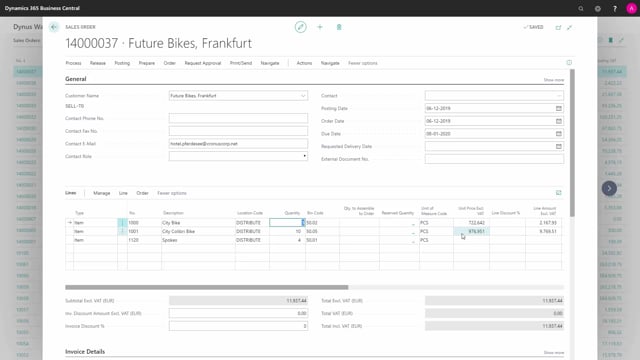
Start with a sales order where nothing has been shipped yet. On the sales line, the quantity to ship is filled in, and the quantity shipped is zero. From this sales order, you create an inventory pick.
On the inventory pick, you enter the quantity to handle on all lines. Once that is filled in, the pick is ready to post.
Posting and optionally invoicing from the inventory pick
From the inventory pick, you select post. If you also want to invoice the order at the same time, you choose to invoice it. That is useful when you want to print the invoice and pack it with the goods.
What happens after posting
When you post the inventory pick, the original pick is deleted and becomes a posted inventory pick. At the same time, the system creates a posted sales shipment, which you can see reflected on the sales line.
The quantity to ship on the sales line is now blank, which confirms that everything has been posted. From the sales order, you can navigate directly into the posted sales shipment to review what was shipped.
Q&A
Does posting an inventory pick also post the shipment on the sales order?
Yes. When you post an inventory pick in Business Central, it automatically posts the shipment on the related sales order and creates a posted sales shipment. You do not have to register the shipment separately.
Can I invoice directly when posting an inventory pick?
Yes. When you post the inventory pick, you can choose to invoice it at the same time. This is handy when you need to print the invoice and pack it together with the goods.
What happens to the inventory pick after I post it?
The original inventory pick is deleted and becomes a posted inventory pick. The system also creates a posted sales shipment, and the quantity to ship on the sales line becomes blank.
How do I check what was shipped after posting?
From the sales order, you can navigate directly into the posted sales shipment to review what was shipped.