
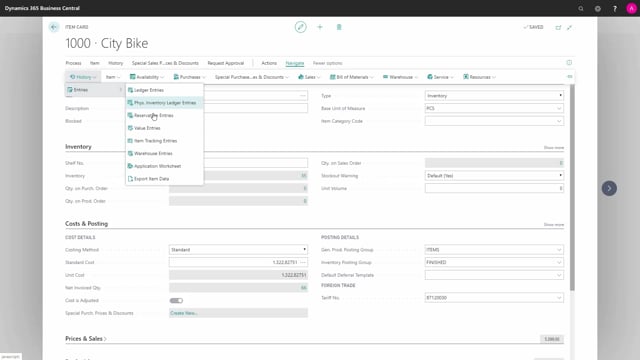


In Business Central, warehouse entries and item ledger entries are stored in two separate tables. The item ledger entries control the actual inventory quantities and amounts. The warehouse entries only track bin-level movements with quantities and unit of measure codes.
You cannot navigate directly from item ledger entries to warehouse entries, because no application link ties the two together. They are synchronized through journal tools, but they are not linked.
When you drill into the inventory field on an item card, you see only the item ledger entries. The warehouse entries live in their own table that gets stamped each time something happens in the warehouse.
Item ledger entries control your inventory quantities
When you drill into the inventory field on an item card in Business Central, you see your item ledger entries. This is the same view you get if you go through the navigation tab and pick the item ledger entries. These entries are what control the amounts on inventory.
In a typical example, you might have eight item ledger entries with quantities and amounts, but no bin codes. The item ledger entries are not about warehouse transactions, and there is no direct connection between them and the warehouse entries.
Warehouse entries live in a separate table
When you use the navigate function on an item, you can find value entries and application entries among the related records. You will not find warehouse entries there. The warehouse entry sits in its own separate table that simply gets stamped each time something happens in the warehouse.
If you navigate on the item and look at the warehouse entries directly, filtered by location code, you might see something like 39 warehouse entries for the same item. These are entries with stamps of quantity and unit of measure code, nothing more.
You cannot navigate between the two entry types
You cannot navigate from item ledger entries into warehouse entries. They are not tied together by any application or any other relationship. The warehouse entries are simply a separate table.
This separation is by design, not an error. Business Central gives you tools in the different journals to align the two and keep everything correct against each other. The result is that the two are synchronized, but they are not linked.
What this means in practice
Keep in mind that inventory accuracy and warehouse accuracy are tracked in two different places. When you reconcile inventory, you work with the item ledger entries. When you need bin-level detail, you look at the warehouse entries. If the two ever get out of step, the journal tools are how you bring them back in line.
Q&A
What do item ledger entries control in Business Central?
Item ledger entries control the amounts on inventory. When you drill into the inventory field on an item card, you see these entries with their quantities and amounts.
Why can’t I navigate from item ledger entries to warehouse entries?
The two record types are not tied together by any application link. The warehouse entry sits in its own separate table, so there is no relationship to navigate through. You can view warehouse entries by navigating on the item directly, but not from the item ledger entries.
What information do warehouse entries contain?
Warehouse entries are stamps of quantity and unit of measure code, tied to bin and location level. They get created each time something happens in the warehouse.
Are item ledger entries and warehouse entries kept in sync?
Yes. They are synchronized through tools in the different journals that align the two and keep them correct against each other. They are synchronized, but they are not linked.