
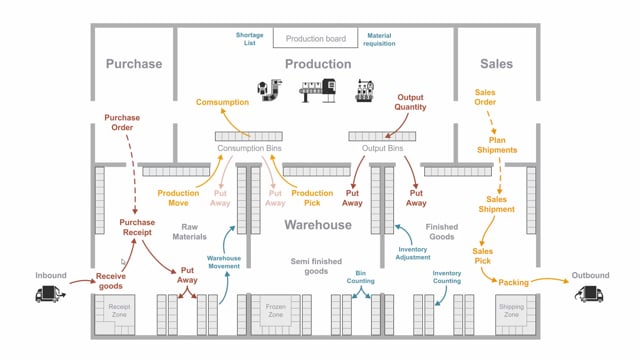


In Microsoft Dynamics 365 Business Central you can choose between two ways of handling picking activities in your warehouse: the inventory pick and the warehouse pick. The inventory pick is created directly from a sales order, while the warehouse pick is created from a warehouse shipment.
The inventory pick is the simpler of the two. When you post it, Business Central creates both item ledger entries and warehouse entries in one go, and it updates both the bin content and the inventory amount at the same time. The warehouse pick handles only part of this work and relies on the warehouse shipment to complete the process.
You use an inventory pick when you want a straightforward, guided picking activity without the extra steps that come with warehouse shipments.
The difference between an inventory pick and a warehouse pick
The main difference comes down to where each document is created. The inventory pick is created directly from a sales order. The warehouse pick is created from a warehouse shipment.
That distinction has practical consequences. The inventory pick handles the full posting in a single step, whereas the warehouse pick works together with the warehouse shipment and only performs part of the functionality on its own.
What the pick functionality actually does
At its core, a pick is there to guide your warehouse employee through a picking route. The document tells the employee where to find the items for a specific order, which shelves and bins to go to, and how many items to pick in which quantities.
This is the base functionality you get with any pick: a clear, guided route through your inventory so the warehouse employee knows exactly where to find each item for the specific order.
What happens when you post an inventory pick
When you post an inventory pick, Business Central does several things in one go:
- It creates item ledger entries
- It creates warehouse entries
- It updates the bin content
- It updates the inventory amount on the item ledger entry
Because everything happens together when you post, the inventory pick works as a shortcut compared to the warehouse pick. You get a simple warehouse activity that covers both the inventory and the warehouse side without needing a separate shipment document.
When to use an inventory pick
The inventory pick is a good fit when you want one document that shows where to find the items for a specific order, and you don’t need the additional steps and document flow that come with warehouse shipments. It gives you the guided picking route while keeping the posting process simple.
Q&A
What is the difference between an inventory pick and a warehouse pick in Business Central?
An inventory pick is created directly from a sales order, while a warehouse pick is created from a warehouse shipment. The inventory pick handles the full posting in one step, whereas the warehouse pick works together with the warehouse shipment and only performs part of the functionality.
What happens when you post an inventory pick?
When you post an inventory pick, Business Central creates both item ledger entries and warehouse entries in one go, and it updates the bin content as well as the inventory amount on the item ledger entry.
What is the purpose of a pick document?
The base functionality of a pick is to guide the warehouse employee through a picking route in the inventory. It tells the employee where to find the items for a specific order, which shelves and bins to go to, and how many items to pick in which quantities.
When should you use an inventory pick?
Use an inventory pick when you want a simple, guided warehouse activity tied directly to a sales order, without needing the extra steps and document flow that come with warehouse shipments.