
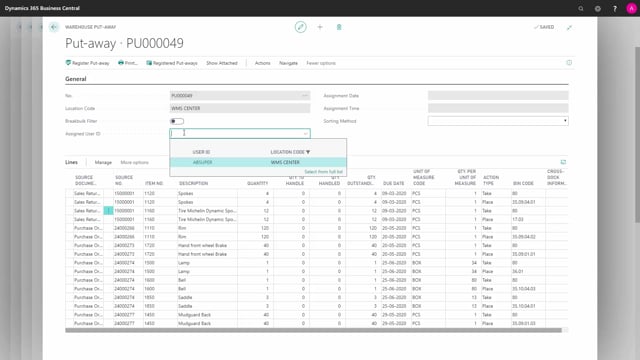


In Microsoft Dynamics 365 Business Central, there are two different documents for putting items away in your warehouse: the inventory put-away and the warehouse put-away. They look similar at first glance, but they work in fundamentally different ways. The inventory put-away is used on simple locations, can be created manually, and posts both item ledger entries and warehouse activity in one step. The warehouse put-away is used on more complex locations with directed put-away and pick, cannot be created manually, and only registers warehouse entries because the items are already received into inventory.
The inventory put-away has a one-to-one relation to its source document and one line per purchase line, so you cannot split lines. The warehouse put-away can cover multiple source documents and gives you two lines per item, a take line and a place line, which you can handle separately. The warehouse put-away also supports break-bulk functionality and lets you assign a warehouse employee on the header, which the inventory put-away does not.
Inventory put-away: manual creation and direct posting
The inventory put-away is the simpler of the two documents. You can create it manually by pressing New. The document assigns a location code that you are set up on as a warehouse employee, and then you select the source document.
You can only select one source document per inventory put-away. There is a one-to-one relation between the source document and the inventory put-away, so if you try to select two source documents, only the last one will actually apply.
On an inventory put-away you cannot assign a warehouse employee on the header, and you cannot use break-bulk functionality. Both of those belong to the warehouse put-away. You also get only one line per purchase line, and you cannot split it. You enter the bin code directly on each line, telling the system where to put the item, and you fill in the quantity to handle.
What happens when you post an inventory put-away
When you work with an inventory put-away, the item does not exist in your inventory yet. You have not received it. The source documents, such as the two purchase orders, use a location code that does not require a warehouse receipt.
The button on the inventory put-away says Post. When you post the document, it does everything in one step:
- Posts the purchase order
- Creates item ledger entries
- Creates a posted purchase receipt
- Creates a posted inventory put-away, placing the item on the bin code you selected on the line
So a single posting creates both the receipt entries and the put-away entries at the same time.
Warehouse put-away: created from source documents, not manually
The warehouse put-away applies to more complex locations. You cannot create it manually, so there is no New option. The warehouse put-away is created from the source documents, which means purchase orders, transfer orders and sales return orders, when you post those documents.
If a warehouse put-away already exists, a purchase receipt must already have been created and posted. When you open the warehouse put-away, you can see in the source document list and the source document numbers that one warehouse put-away can apply to several different documents.
This means a purchase receipt was already made with all those documents imported into it, and that receipt was posted. The items are already on inventory at this point, but they are all placed on the receive bin, for example bin code 80.
Take and place lines on the warehouse put-away
Because the items are already on the receive bin, the warehouse put-away gives you two lines per item or purchase line or sales return line. For each line you have a take line and a place line, and you can work with the two lines separately.
The take line tells you to take the item from bin code 80, the receive bin where it was originally received. The place line suggests a bin code to move the item to, and you can change that bin code to whatever you want before you handle the put-away. You take the item from your receive bin and place it on the bin you decide on.
On a warehouse put-away you can use break-bulk functionality, as long as the directed put-away and pick checkmark is set on the location. You can assign a warehouse employee on the header, and you can work with sorting methods and similar settings.
Registration versus posting
The biggest practical difference is the action you take to complete the document. On a warehouse put-away the button does not say Post. It says Register, because the document only creates warehouse entries. The items are already received.
The item ledger entries were already created with the original warehouse receipt. So when you register a warehouse put-away, it only creates warehouse entries that move the items from your receive bin code into the different bin codes you add on the document lines.
Q&A
What is the difference between an inventory put-away and a warehouse put-away in Business Central?
An inventory put-away is used on simple locations, can be created manually, has a one-to-one relation to one source document, and posts item ledger entries and the put-away in one step. A warehouse put-away is used on complex locations with directed put-away and pick, is created automatically from posted source documents, can cover several source documents, and only registers warehouse entries because the items are already received.
Can I create a warehouse put-away manually?
No. The warehouse put-away is created from the source documents, meaning purchase orders, transfer orders and sales return orders, when you post those documents. There is no New option. The inventory put-away, on the other hand, can be created manually.
Why does the warehouse put-away say Register instead of Post?
Because the items are already received into inventory through the warehouse receipt, which created the item ledger entries. The warehouse put-away only creates warehouse entries that move the items from the receive bin into the bins you choose, so the action is a registration, not a posting.
Can I assign a warehouse employee and use break-bulk functionality on an inventory put-away?
No. Both assigning a warehouse employee on the header and using break-bulk functionality apply only to the warehouse put-away. Break-bulk requires the directed put-away and pick checkmark on the location.
Why does the inventory put-away only let me select one source document?
There is a one-to-one relation between the source document and the inventory put-away. If you try to select two source documents, only the last one applies. The warehouse put-away can cover multiple source documents.
Why does a warehouse put-away have two lines per item?
Because the items are already received and placed on the receive bin. You get a take line that tells you to take the item from the receive bin, and a place line that suggests the bin to move it to. You can handle the two lines separately and change the place bin code.