
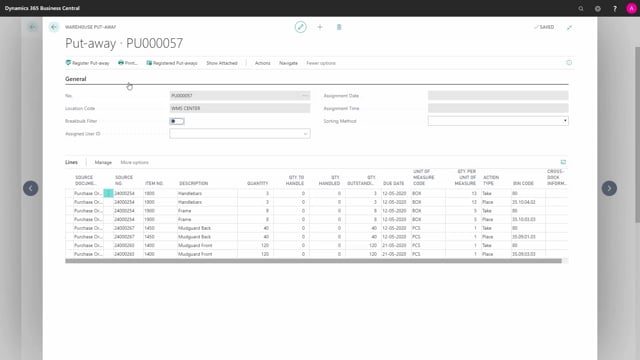


A warehouse put-away in Microsoft Dynamics 365 Business Central is a document that only creates warehouse entries. It moves your items from the receiving bin to the inventory bin where you want to store them. The put-away does not affect your item ledger entries. Those are already posted when you post the warehouse receipt.
You typically get a warehouse put-away document automatically when you post a warehouse receipt. The receipt posts the receipt on the purchase orders and creates the warehouse entries, and Business Central then generates the put-away document for you.
The put-away document guides the warehouse employee from the receiving bin to the correct inventory bins. It contains a take line for the receiving bin and a place line for the bin where the item should be stored. You can change the suggested bin code and the quantity to handle, or let Business Central fill it in automatically based on your setup.
What a warehouse put-away does in Business Central
A warehouse put-away is a document that only creates warehouse entries. Its purpose is to move your items from the receiving bin to the inventory bin where you want to store them. It does not post anything on your purchase order, and it does not touch your item ledger entries. The movement happens purely at the warehouse level.
How the warehouse put-away is created from a warehouse receipt
In a typical scenario you start with a warehouse receipt. A warehouse receipt is prepared from one or more source documents. In this example, the receipt is prepared from three different purchase orders.
When you post the warehouse receipt, two things happen at once. It posts the receipt on the purchase orders, so your item ledger entries are done. It also creates the warehouse entries and automatically generates a warehouse put-away document for you to work with.
How the put-away document is structured
The put-away document is built to let you collect the items in the receiving bin and place them in inventory. In this example the receiving bin is bin code 80.
The document has two types of lines:
- Take line on the receiving bin, here bin code 80, telling the employee where to pick up the items.
- Place line with the suggested bin code where the item should be stored. You can change this bin if you need to put the item somewhere else.
You can print the document and follow a put-away route through your warehouse while you store the items. Along the way you can change the bin code, update the document, and adjust the quantity to handle. The quantity to handle can also be filled in automatically depending on your setup.
What happens when you register the put-away
Once you have filled in the lines and you register the put-away, the only thing that happens is that Business Central creates warehouse entries. Those entries move the items from the receiving zone or receiving bin into the inventory bins you have specified.
The purchase orders are already posted at this point, and the item ledger entries are already done. The put-away document does not change any of that. It is purely a tool to guide the warehouse employee on where to take the items in the warehouse.
Q&A
Q&A
What does a warehouse put-away document do in Business Central?
It only creates warehouse entries. It moves your items from the receiving bin to the inventory bin where you want to store them. It does not post anything on the purchase order and does not affect your item ledger entries.
How is a warehouse put-away document created?
When you post a warehouse receipt, Business Central posts the receipt on the source documents and automatically creates a warehouse put-away document for you.
What is the difference between a take line and a place line on a put-away?
The take line tells the employee which bin to pick the items from, such as the receiving bin code 80. The place line shows the suggested inventory bin where the item should be stored, and you can change that bin if needed.
Can a warehouse put-away handle items from several purchase orders?
Yes. A warehouse receipt can be prepared from one or more source documents. In this example the receipt covers three different purchase orders, and the resulting put-away handles all of them.
What happens when you register a warehouse put-away?
Business Central creates warehouse entries that move the items from the receiving bin into the inventory bins you have specified. The purchase orders and item ledger entries are already posted and are not changed by registering the put-away.