
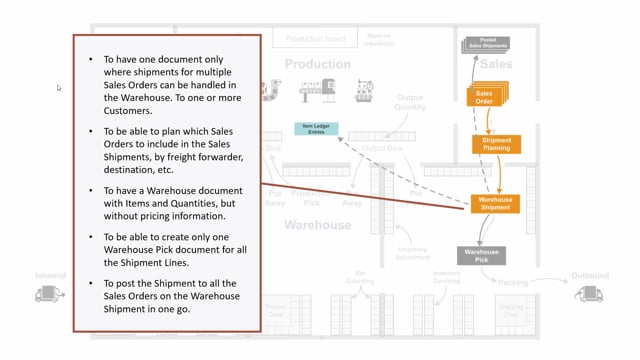


Warehouse shipments in Microsoft Dynamics 365 Business Central give you one document where you can bundle multiple sales orders and other outbound documents before you pick, pack, and post them. You create a warehouse shipment typically from a sales order, but it can also come from other outbound documents.
You can use warehouse shipments to combine several sales orders for the same customer, including orders with backlogs, into one shipment. You can also group sales orders by country, freight forwarder, or geography so the goods are handled together.
A warehouse shipment shows only quantities and items, not prices. The cost price and sales price are removed, so warehouse employees do not see them when shipping goods.
You can create one warehouse pick that covers several sales orders, and you can post the entire shipment in one go, which posts all the picked and packed items on every linked sales order at once.
What a warehouse shipment is and where it comes from
A warehouse shipment is a separate warehouse document that you usually create from a sales order. It can also be created from other outbound documents. The point is to gather the work that needs to happen in the warehouse into one place, rather than working directly on the sales orders.
Bundle multiple sales orders into one warehouse shipment
One of the main reasons to use a warehouse shipment is that you get a single document where you can bundle multiple sales orders going to one or more customers.
For example, you can have several sales orders for the same customer, perhaps some of them with backlogs, and pull them all into one warehouse shipment. You can also take many sales orders for customers in one specific country and bundle them into a single shipment, for instance if you want to transport everything to a hub.
Plan and group sales orders by freight forwarder, geography, or customer
A warehouse shipment lets you plan your sales orders by criteria such as geography, freight forwarder, customer, and more. If you have many sales orders and want to group them by whatever logic suits your operation, you can do that on the warehouse shipment.
A practical example: you have a specific freight forwarder arriving at 10 o’clock in the morning, and you need all the picks ready for that pickup. You gather all the sales orders going with that freight forwarder into one warehouse shipment. When a later freight forwarder arrives, you create a new warehouse shipment for those orders. This way you control the order in which sales orders move through the warehouse.
Hide prices from warehouse employees
A warehouse shipment handles only quantities and items. It does not include prices the way a sales order does.
For some companies this matters, because they don’t want warehouse employees to see the prices on the goods they are shipping. On the warehouse shipment, both the cost price and the sales price are taken away.
Use warehouse shipments with external warehouses
If you work with external warehouses, the warehouse shipment is useful. It is easy to create a warehouse shipment and send it as a file, or you can let the external warehouse look directly into the warehouse shipment in your ERP system.
Create one warehouse pick for several sales orders
You can make one warehouse pick that handles activities for many different customers in one go. You can also achieve this with several warehouse shipments, because in a pick journal you can select picks from many sales orders.
The straightforward approach is to bundle the orders on the warehouse shipment and then create one pick from one shipment, or from more if needed.
Post the entire shipment in one go
When you post a warehouse shipment, everything that has been picked and packed is posted at once across all the sales orders linked to that shipment. You handle the whole shipment in a single posting instead of posting each sales order separately.
Q&A
What is a warehouse shipment in Business Central?
It is a warehouse document, usually created from a sales order, that lets you bundle multiple sales orders and other outbound documents into one document so you can plan, pick, pack, and post them together.
Can I combine several sales orders into one warehouse shipment?
Yes. You can bundle multiple sales orders for one or more customers, including orders with backlogs, into a single warehouse shipment.
Why don’t prices show on a warehouse shipment?
A warehouse shipment handles only quantities and items. Both the cost price and the sales price are removed, so warehouse employees don’t see prices on the goods they ship.
How can I group sales orders by freight forwarder?
On the warehouse shipment you can plan and group sales orders by freight forwarder, geography, customer, and other criteria. For example, you can gather all orders going with a freight forwarder arriving at 10 o’clock into one shipment, then create a new shipment for the next freight forwarder.
Can I create one pick for several sales orders?
Yes. You can bundle the orders on a warehouse shipment and create one pick that covers them. You can also pick from many sales orders in a pick journal across several warehouse shipments.
What happens when I post a warehouse shipment?
Everything that has been picked and packed is posted in one go across all the sales orders linked to that shipment.
Can external warehouses use my warehouse shipments?
Yes. You can send a warehouse shipment as a file to an external warehouse, or let the external warehouse look directly into the warehouse shipment in your ERP system.