
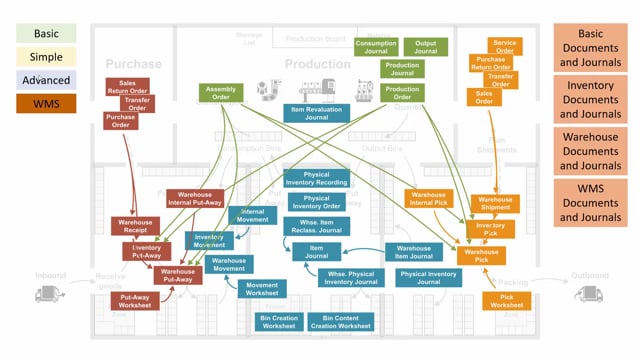


Business Central includes a range of documents and journals for handling inventory and warehouse operations internally. Which ones you can use depends on the checkmarks set on the location card, specifically whether you run basic functionality, simple or advanced bin handling, or directed put-away and pick.
For basic functionality without bins, you use the item journal for positive and negative inventory adjustments and the item revaluation journal to change cost on existing stock.
When you add bins, you get the bin creation worksheet, the bin content creation worksheet, and the item reclassification journal or internal movements for moving items between bins.
For directed put-away and pick locations, you use warehouse-specific tools: the warehouse movement document, the warehouse item reclassification journal, the warehouse item journal for adjustments, the warehouse physical inventory journal for counting, and warehouse internal pick and put-away documents that work without a source document.
Documents and journals in basic Business Central functionality
If you run the basic inventory functionality without bins, you have two main tools to work with.
The item journal lets you make positive and negative adjustments on inventory. This is what you use when you need to correct stock levels up or down.
The item revaluation journal lets you change the cost on items already on stock, so you can revalue them.
At this level you don’t have any journals for bin movements. Those only come into play once you move to the simple or advanced combination of checkmarks on the location.
Bin creation and content worksheets for simple and advanced bin handling
When you start using bins, you get access to the bin creation worksheet and the bin content creation worksheet.
These are most useful when you create new bins, for example when you expand your inventory or start using bin functionality in the warehouse for the first time. The bin content creation worksheet helps you create content for those bins. Afterwards you can synchronize the content using an item journal.
Moving items between bins
To move items in the warehouse, you have two options.
You can use the item reclassification journal, or you can make inventory movements that are created from internal movements. Both handle the moving functionality in the warehouse, so you can shift stock from one bin to another.
Counting inventory without directed put-away and pick
For counting stock on locations that don’t have the directed put-away and pick checkmark, you have a journal and an order-based option.
The physical inventory journal handles straightforward counting.
The physical inventory order is a document where you can calculate what to count. It works together with the physical inventory recordings, which apply to the order. This means you can attach many recordings to one inventory order, which is useful when several people count different parts of the warehouse.
Warehouse documents for directed put-away and pick locations
When you look at a location with the pick checkmark and directed put-away and pick enabled, you get a dedicated set of warehouse documents.
For moving items, you have the warehouse movement, which is a document created from a movement worksheet. You also have the warehouse item reclassification journal, where you can move items directly in a journal.
The difference between the two is about control. The document gives you a more controlled process, and you can print it out and hand it to someone. The journal is what you typically use just to register what you have already done.
For counting on these locations, you have the warehouse item journal for positive and negative adjustments, and the warehouse physical inventory journal for doing inventory counts.
Warehouse internal pick and put-away without a source document
You also have the warehouse internal pick and the warehouse internal put-away. These are documents you use to create picks and put-aways in the warehouse without a source document.
That means you can manually create a pick or put-away document whenever you need one, even when there is no order or shipment driving the activity.
Choosing the right tool for your warehouse setup
All of these documents and journals exist to handle the main internal warehouse processes: adjusting, revaluing, moving, and counting. The key is that the right tool depends on the checkmarks on your location card. Start by deciding whether you run basic functionality, bin handling, or directed put-away and pick, and the available documents and journals follow from there.
Q&A
Which journals do you use for inventory adjustments in basic Business Central functionality?
You use the item journal for positive and negative adjustments on inventory, and the item revaluation journal to change the cost on existing items on stock.
What is the difference between the bin creation worksheet and the bin content creation worksheet?
The bin creation worksheet is used to create new bins, for example when you expand inventory or start using bin functionality. The bin content creation worksheet helps you create content for those bins, which you can then synchronize using an item journal.
How do you move items between bins in Business Central?
You can use the item reclassification journal, or you can make inventory movements created from internal movements. On directed put-away and pick locations, you use the warehouse movement document or the warehouse item reclassification journal.
What is the difference between the physical inventory journal and the physical inventory order?
The physical inventory journal handles straightforward counting. The physical inventory order is a document where you can calculate what to count, and it works with physical inventory recordings, so you can attach many recordings to one inventory order.
What are the warehouse internal pick and put-away documents used for?
They let you create picks and put-aways in the warehouse without a source document, so you can manually create a pick or put-away document whenever you need one.
When should you use a document instead of a journal for warehouse moves?
Use a document when you want a more controlled process or need to print it and hand it to someone. Use a journal when you just want to register what you have already done.