
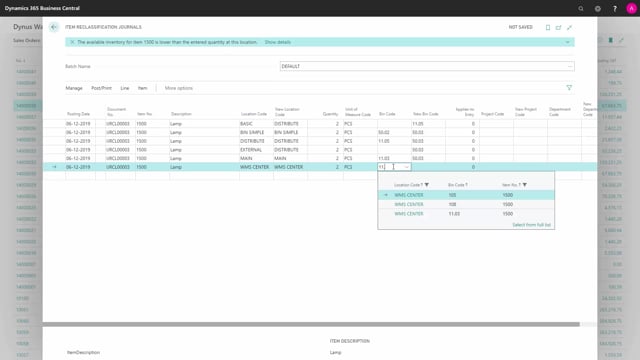


The item reclassification journal in Business Central lets you move existing inventory to a new location code, bin code, serial number, lot number, or dimension. You use it for reclassifications only, not for counting, re-evaluation, or positive and negative adjustments.
The item reclassification journal works for locations without a checkmark in Directed Put-away and Pick. If you enter a location that has Directed Put-away and Pick enabled, you get an error message and have to delete the line.
When you reclassify to a location that requires bins, you must enter a bin code. When you post, Business Central creates new item ledger entries, and for locations with mandatory bin codes it also creates warehouse entries.
What the item reclassification journal does
The item reclassification journal lets a warehouse employee change the details on existing inventory without adjusting the quantity on hand. You can change the location code, bin code, serial number, lot number, or dimensions.
This is the key distinction: the reclassification journal takes existing item ledger entries or warehouse entries and transfers them to something else. It is not for counting, not for re-evaluation, and not for positive or negative adjustments. Each of those has its own journal.
Which locations the journal supports
The item reclassification journal applies to locations without a checkmark in Directed Put-away and Pick. That covers a range of setups, from locations with no checkmarks at all on the location card, to locations with some or all checkmarks set, as long as Directed Put-away and Pick stays off.
For locations that do use Directed Put-away and Pick, you have to use warehouse documents instead. The reclassification journal does not handle them.
Moving items between locations with different bin requirements
A common scenario is moving an item from a basic location to a distribution location. The basic location does not require bins, but the distribution location does. So when you reclassify the item, you have to add the new bin code on the line.
The same logic applies on the “from” side. If the location you are taking items from requires bins, you need to specify which bin to take the items from. You can drill down on the bin code to see the list of bins where the item is available in inventory, which makes it easy to pick the right one.
You can bundle items from a bin location, a distribution location, and an external location into the same bin code on the receiving side.
What happens if you enter a Directed Put-away and Pick location
If you accidentally enter a location with Directed Put-away and Pick, the line might not fail right away. You can even enter a quantity. But as soon as you try to fill in anything else on the line, you get an error message: you cannot use a location with Directed Put-away and Pick in the item reclassification journal. At that point you have to delete the line and handle that location another way.
What posting creates
When you post the journal, Business Central reclassifies all the items on the lines. The result depends on the location setup. For locations without bins, posting creates new item ledger entries only. For locations where bin codes are mandatory, posting creates both new item ledger entries and warehouse entries.
Q&A
Can I use the item reclassification journal for locations with Directed Put-away and Pick?
No. The journal only applies to locations without a checkmark in Directed Put-away and Pick. If you enter such a location, you get an error message saying you cannot use it, and you have to delete the line.
What can I change with the item reclassification journal?
You can change the location code, bin code, serial number, lot number, and dimensions on existing inventory. It transfers existing item ledger entries or warehouse entries to new details.
Can I use the reclassification journal for counting or revaluation?
No. The reclassification journal is only for reclassifications. Counting, re-evaluation, and positive or negative adjustments each have their own journal.
Do I need to enter a bin code when reclassifying items?
You need a bin code when the location requires bins. For example, moving items to a distribution location that requires bins means you must add the new bin code. A basic location that does not require bins does not need one. You can drill down on the bin code to see where the item is available in inventory.
What entries does posting the reclassification journal create?
For locations without bins, posting creates new item ledger entries only. For locations with mandatory bin codes, posting also creates warehouse entries.