
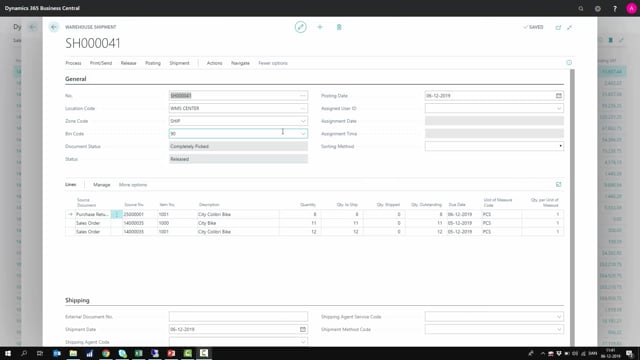


The warehouse shipment document in Microsoft Dynamics 365 Business Central is where you control the final step of getting goods out the door. You post it to create the posted warehouse shipment and the related posted sales shipment, purchase return shipment, or whatever the source document was. You should post the warehouse shipment when the goods physically leave the building, not before. That way you still have time to repack or adjust if something changes.
Before posting, you run the warehouse pick to move items from inventory into the shipping bin. Once everything is picked and sitting in the shipping zone, the order is physically ready to ship. You can leave the warehouse shipment open while you prepare freight documents and packing, and only post it once the freight forwarder arrives to collect the goods.
What the warehouse shipment document does in the picking process
The warehouse shipment document is the document you use to create the warehouse pick. The pick is what sends a worker around the inventory to gather all the items and move them, via the warehouse pick, into the shipping bin.
Once the pick is finished, everything sits in the shipping zone and the order is ready to ship. At this point the goods are physically prepared, but the warehouse shipment has not been posted yet.
When to post the warehouse shipment
It is up to you to decide exactly when you post the warehouse shipment, but the general rule is straightforward: post it when the goods are actually leaving the door.
The reason is practical. If someone needs to repack the shipment or change something at the last minute, it is too late once you have posted. So leave the warehouse shipment open as long as the goods are still in the shipping bin. While it stays open, you can prepare all the documents for the freight forwarder, finish the packing, and handle everything else around the shipment.
When the freight forwarder arrives to pick up the goods, you open the warehouse shipment, go to the posting menu, and select Post Shipment, or Post and Print if you also want to print the shipping bill at the same time.
What posting the warehouse shipment creates
When you post the warehouse shipment, Business Central creates two records:
- A posted warehouse shipment
- A posted source document shipment, such as a posted sales shipment or a purchase return order shipment, depending on what the source document was
If you then open the list of posted warehouse shipments, the one you just posted appears as the most recent entry. That is what happens when you post your warehouse shipment.
Q&A
What is the warehouse shipment document used for in Business Central?
It is the document you use to create the warehouse pick, which gathers items from inventory and moves them into the shipping bin. When you post it, it creates a posted warehouse shipment and a posted source document shipment, such as a posted sales shipment or purchase return order shipment.
When should you post the warehouse shipment?
Post it when the goods are actually leaving the building, typically when the freight forwarder arrives to collect them. If you post earlier and someone needs to repack or adjust the shipment, it is too late.
Can you keep the warehouse shipment open while preparing freight documents?
Yes. Leave it open as long as the goods are still in the shipping bin. This gives you time to prepare freight forwarder documents and finish all the packing before you post.
How do you print the shipping bill when posting?
Choose Post and Print instead of Post Shipment. This posts the warehouse shipment and prints the shipping bill in one step.