
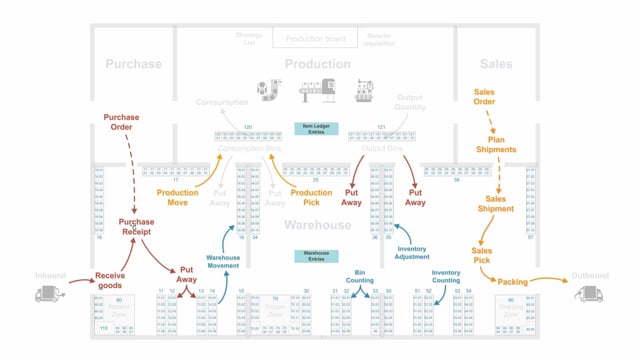


In Business Central, inventory and warehouse functionality work on two different levels. Inventory processes create item ledger entries that handle quantities and unit cost. Warehouse functionality adds bins and creates warehouse entries that track where items are physically located.
When you receive goods, the purchase receipt posts to the item ledger entry level. The put-away posts to the warehouse entry level and places the item in a specific bin. The two levels are synchronized so warehouse entries roll up into item ledger entries.
To use warehouse functionality, you first set up bins with unique bin codes so you can track items per bin. You then handle put-aways, picks, and internal activities such as warehouse movements, bin counting, and inventory counting, all of which create warehouse entries.
Inventory and warehouse are two different levels in Business Central
Business Central handles items on two levels. The inventory level uses item ledger entries to keep track of quantities in the system and the unit cost. This is the core functionality that tells you how much you have and what it costs.
The warehouse level sits on top of that. It tells you where your items physically are. When you turn on warehouse functionality, you add another layer of detail that the basic inventory processes do not cover.
Bins are the starting point for warehouse functionality
The first thing you do when you move into warehouse functionality is set up bins in the system. Bins let you distinguish between all the different places in your inventory, each with a unique bin code. Once your bins are in place, you can handle items per bin instead of just knowing the total quantity on hand.
How inbound and outbound processes work with warehouse functionality
On the inbound and outbound side, you can create a purchase receipt and a sales shipment. This lets you plan multiple orders on both sides and handle several items in the same go.
After the receipt, you create put-aways in the warehouse. The put-away places the items into specific bins and creates warehouse entries. So while the receipt and the shipment post at the item ledger entry level, the put-away posts at the warehouse entry level.
Picking works the same way in reverse. When you pick for production orders, sales orders, assembly orders, or transfer orders, you take the items from specific bins and create warehouse entries. A warehouse entry is a registration of a movement in the warehouse.
Internal warehouse activities also create warehouse entries
Besides inbound and outbound movements, you have internal activities in the warehouse. These include:
- Warehouse movements between bins
- Bin counting, where you count a specific bin
- Inventory adjustment for correcting the inventory
- The yearly inventory counting for larger areas in the warehouse
All of these create warehouse entries. The warehouse entries are then synchronized up into the item ledger entries once in a while, so the two levels stay aligned.
Q&A
What is the difference between item ledger entries and warehouse entries in Business Central?
Item ledger entries handle the quantities and unit cost at the inventory level. Warehouse entries track where items physically sit in specific bins. Warehouse entries are synchronized up into the item ledger entries.
What do you need to set up before using warehouse functionality?
You set up bins with unique bin codes. Bins let you distinguish between the different places in your inventory and handle items per bin.
What is the difference between a purchase receipt and a put-away?
The purchase receipt posts at the item ledger entry level. The put-away posts at the warehouse entry level and places the item into a specific bin.
Which warehouse activities create warehouse entries?
Put-aways, picks for production, sales, assembly, and transfer orders, warehouse movements, bin counting, inventory adjustment, and yearly inventory counting all create warehouse entries.