
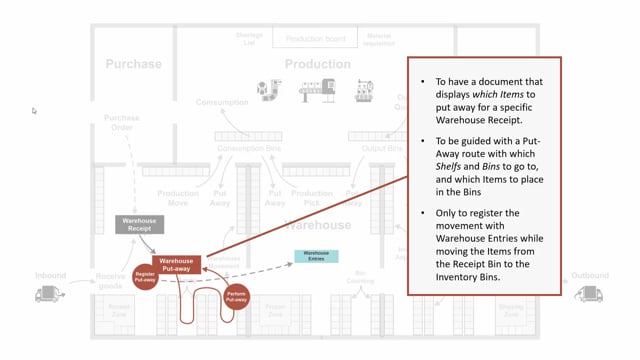


In Microsoft Dynamics 365 Business Central, the difference between a warehouse put-away and an inventory put-away comes down to whether you have enabled the “Require Receive” checkmark on your location card. The inventory put-away is created directly from a purchase order when “Require Receive” is not enabled. The warehouse put-away is created from a warehouse receipt when “Require Receive” is enabled.
When you register a warehouse put-away document, it creates warehouse entries but not item ledger entries. The item ledger entries are already posted through the warehouse receipt, so the put-away only handles the physical movement of items to bins and shelves.
Both document types give you a guided routing that tells warehouse users which bins and shelves to go to and where to place each item.
The difference between warehouse put-away and inventory put-away in Business Central
The two document types serve the same overall purpose, but they are triggered differently depending on how you set up your location.
The inventory put-away document is created directly from a purchase order. This happens when you do not have the “Require Receive” checkmark set on your location card.
The warehouse put-away document is created from a warehouse receipt. This happens when you have set the “Require Receive” checkmark on the location card.
What a warehouse put-away document does
The purpose of a warehouse put-away is similar to an inventory put-away. You want a document that shows which items to put away from a specific warehouse receipt, and you want a guided routing for the put-away.
The guided routing tells you which shelves and bins to go to and where to place the different items. This gives the warehouse user a clear, guided help on where each item should go.
How posting works with a warehouse put-away
When you register the warehouse put-away document, it creates warehouse entries. It does not create item ledger entries.
This is because the warehouse put-away is a document that comes from the warehouse receipt. The item ledger entry is already posted through the warehouse receipt. The warehouse put-away document works on its own and only creates warehouse entries.
Q&A
What decides whether you get a warehouse put-away or an inventory put-away?
The “Require Receive” checkmark on the location card decides it. If it is not set, you get an inventory put-away created directly from the purchase order. If it is set, you get a warehouse put-away created from a warehouse receipt.
Does a warehouse put-away document post item ledger entries?
No. The warehouse put-away document only creates warehouse entries. The item ledger entries are already posted through the warehouse receipt.
What is the purpose of the guided routing in a put-away document?
The guided routing tells the warehouse user which shelves and bins to go to and where to place each item from a specific warehouse receipt.